


Features • Installation • Usage • Contributing • Additional Notes
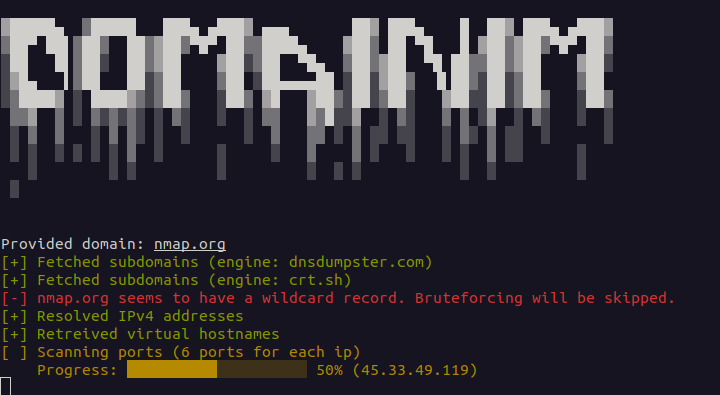
Domainim is a fast domain reconnaissance tool for organizational network scanning. The tool aims to provide a brief overview of an organization's structure using techniques like OSINT, bruteforcing, DNS resolving etc.
Current features (v1.4.0)-
- Subdomain enumeration (6 engines + bruteforcing). Engines are queried concurrently-
- User-friendly output
- Resolving A records (IPv4) and AAAA records (IPv6)

- Virtual hostname enumeration
- Reverse DNS lookup

- Detects wildcard subdomains (IPv4 and IPv6). Passive results that resolve only to the wildcard IPs are hidden unless they were seen in a TLS certificate. Bruteforcing can be forced with
--force-brute, in which case results resolving only to the wildcard IPs are discarded

- Basic TCP port scanning
- Basic UDP port scanning (opt-in with
--udp-ports, no root needed) - Subdomains are accepted as input

- Multiple domain enumeration. Several domains can be given as arguments or in a file (
--list | -i), and are enumerated one after the other - Directory busting (opt-in with
--dir-wordlist). Paths from a wordlist are probed onhttpandhttpsof every subdomain found, with soft-404 filtering. See Directory busting - Export results to JSON file

The project is inspired by Sublist3r. The port scanner module is heavily based on NimScan.
You can build this repo from source-
- Clone the repository
git clone git@github.com:pptx704/domainim- Build the binary
nimble build- Run the binary
./domainim <domain>... [--list=<filename>] [--ports=<ports>] [--udp-ports=<ports>] [--dir-wordlist=<filename>]Or, you can just download the binary from the release page. Keep in mind that the binary is tested on Debian based systems only.
./domainim <domain>... [--list=<filename> | -i:<filename>] [--ports=<ports> | -p:<ports>] [--udp-ports=<ports>] [--wordlist=<filename> | -l:<filename> [--rps=<int> | -r:<int>] [--force-brute | -f]] [--dns=<dns> | -d:<dns>] [--out=<filename> | -o:<filename>] [--dir-wordlist=<filename> [--dir-status=<list>] [--dir-rps=<int>] [--dir-concurrency=<int>]]
<domain>...is one or more domains to be enumerated. Each can be a subdomain as well. See Multiple domains.--list | -iis the path to a file with target domains. See Multiple domains. Write the value as--list=<filename>or-i:<filename>;--list <filename>with a space does not work.--ports | -pis a string specification of the ports to be scanned. It can be one of the following-all- Scan all ports (1-65535)none- Skip port scanning (default)t<n>- Scan top n most common ports (same asnmap). i.e.t100scans top 100 ports. Max value is 5000. If n is greater than 5000, it will be set to 5000.- single value - Scan a single port. i.e.
80scans port 80 - range value - Scan a range of ports. i.e.
80-100scans ports 80 to 100 - comma separated values - Scan multiple ports. i.e.
80,443,8080scans ports 80, 443 and 8080 - combination - Scan a combination of the above. i.e.
80,443,8080-8090,t500scans ports 80, 443, 8080 to 8090 and top 500 ports
--udp-portsis a string specification of the UDP ports to be scanned. It uses the same grammar as--ports(all,none,t<n>, single value, range value, comma separated values and combinations). UDP scanning is off unless this option is given with at least one port;--portsstays TCP-only and never enables UDP. Note thatt<n>uses the same top ports list as the TCP scan, which is ordered by TCP popularity. i.e.--udp-ports=53scans UDP port 53--udp-ports=53,123,161scans UDP ports 53, 123 and 161--udp-ports=1-1024scans UDP ports 1 to 1024--udp-ports=t100scans the top 100 ports as UDP--ports=80,443 --udp-ports=53,t20scans TCP ports 80 and 443, and UDP port 53 and the top 20 ports
--dns | -dis the address of the dns server. This should be a valid IPv4 address and can optionally contain the port number-a.b.c.d- Use DNS server ata.b.c.don port 53a.b.c.d#n- Use DNS server ata.b.c.don portn
--wordlist | -l- Path to the wordlist file. This is used for bruteforcing subdomains. If the file is invalid, bruteforcing will be skipped. Empty lines and lines starting with#are ignored. You can get a wordlist from SecLists. A wordlist is also provided in the release page.--force-brute | -f- Bruteforce even if a wildcard record is found. Subdomains that resolve only to the wildcard IPs are discarded.--rps | -r- Number of requests to be made per second during bruteforce. The default value is1024 req/s. It is to be noted that, DNS queries are made in batches and next batch is made only after the previous one is completed. Since queries can be rate limited, increasing the value does not always guarantee faster results.--dir-wordlist,--dir-status,--dir-rps,--dir-concurrency- Directory busting. Off unless--dir-wordlistis given. See Directory busting.--out | -o- Path to the output file. The output will be saved in JSON format. The filename must end with.json.
Examples
./domainim nmap.org --ports=all./domainim nmap.org scanme.nmap.org --out=results.json./domainim nmap.org --list=targets.txt./domainim google.com --ports=none --dns=8.8.8.8#53./domainim pptx704.com --ports=t100 --wordlist=wordlist.txt --rps=1500./domainim pptx704.com --ports=t100 --wordlist=wordlist.txt --out=results.json./domainim nmap.org --wordlist=wordlist.txt --force-brute./domainim mysite.com --ports=t50,5432,7000-9000 --dns=1.1.1.1./domainim domainim.com --ports=80 --udp-ports=53,123./domainim nmap.org --udp-ports=53,123,161 --out=results.json./domainim nmap.org --dir-wordlist=paths.txt --dir-status=200,301-303 --dir-rps=20 --dir-concurrency=10
The help menu can be accessed using ./domainim --help or ./domainim -h.
Usage:
    domainim <domain>... [--list=<filename> | -i:<filename>] [--ports=<ports> | -p:<ports>] [--udp-ports=<ports>] [--wordlist=<filename> | -l:<filename> [--rps=<int> | -r:<int>] [--force-brute | -f]] [--dns=<dns> | -d:<dns>] [--out=<filename> | -o:<filename>] [--dir-wordlist=<filename> [--dir-status=<list>] [--dir-rps=<int>] [--dir-concurrency=<int>]]
    domainim (-h | --help)

Options:
    -h, --help              Show this screen.
    -i, --list              File with target domains, one per line. Blank lines and lines starting with `#` are ignored.
                            Combines with domains given as arguments. Duplicates are removed.
    -p, --ports             Ports to scan. [default: `none`]
                            Can be `all`, `none`, `t<n>`, single value, range value, combination
    --udp-ports             UDP ports to scan. Same format as --ports. [default: `none`]
                            Replies are reported as open, silence as open|filtered.
    -l, --wordlist          Wordlist for subdomain bruteforcing. Bruteforcing is skipped for invalid file.
    -f, --force-brute       Bruteforce even if a wildcard record is found. Results resolving only to wildcard IPs are discarded.
    -d, --dns               IP and Port for DNS Resolver. Should be a valid IPv4 with an optional port [default: system default]
    -r, --rps               DNS queries to be made per second [default: 1024 req/s]
    --dir-wordlist          Wordlist of paths for directory busting on http and https of every resolved subdomain. Enables the feature.
    --dir-status            Status codes to report, a list of values and ranges [default: `200,204,301,302,307,308,401,403`]
    --dir-rps               Directory busting requests to be made per second [default: 50 req/s]
    --dir-concurrency       Directory busting requests in flight at once [default: 20]
    -o, --out               JSON file where the output will be saved. Filename must end with `.json`

Examples:
    domainim domainim.com --ports=80 --udp-ports=53,123
    domainim domainim.com domainim.org --list=targets.txt
    domainim domainim.com -p:t500 -l:wordlist.txt --dns:1.1.1.1#53 --out=results.json
    domainim domainim.com --dir-wordlist=paths.txt --dir-status=200,301-303 --dir-rps=20 --dir-concurrency=10
    domainim sub.domainim.com --ports=all --dns:8.8.8.8 -l:wordlist.txt -r:1500 -f -o:results.json
The JSON schema for the results of a single domain is as follows (for several domains see Multiple domains)-
[
  {
    "subdomain": string,
    "ipv6": [string],
    "data": [
      {
        "ipv4": string,
        "vhosts": [string],
        "reverse_dns": string,
        "ports": [int],
        "udp_ports": [int],
        "udp_open_filtered": [int]
      }
    ]
  }
]
ipv6 lists the IPv6 addresses (AAAA records) of the subdomain. It is always present and is an empty list when the subdomain has none. The addresses are in compressed lowercase form and sorted as strings. The key comes right after subdomain and before data. Entries of data stay IPv4-based: there is one entry for each IPv4 address, and IPv6 addresses never get an entry of their own. All other fields keep their names, types and meaning, so ipv6 is the only addition to the JSON output.
ports is always present and lists the open TCP ports. udp_ports and udp_open_filtered are present only when --udp-ports was given with at least one port; without it they are left out. All three lists are sorted. data is an empty list for a subdomain without a public IPv4 address, also when it has IPv6 addresses.
udp_ports- UDP ports that answered a probe (open)udp_open_filtered- UDP ports that did not answer (open|filtered)
UDP port states-
- open - the host replied to the probe. Shown as
Open UDP Portsin the terminal and inudp_ports. - closed - the host answered with an ICMP port unreachable. Closed ports are not shown and not saved.
- open|filtered - no reply arrived within the timeout (1 second), or the probe could not be completed. The port is either open but silent, or a firewall dropped the probe or the ICMP reply; the two cases cannot be told apart. Shown as
Open|Filtered UDP Portsin the terminal and inudp_open_filtered.
Example of a host entry with --udp-ports=53,123,161-
{
  "ipv4": "45.33.32.156",
  "vhosts": ["echo.nmap.org", "scanme.nmap.org"],
  "reverse_dns": "scanme.nmap.org.",
  "ports": [],
  "udp_ports": [123],
  "udp_open_filtered": []
}
Example of a subdomain entry with an IPv4 and two IPv6 addresses-
{
  "subdomain": "scanme.nmap.org",
  "ipv6": [
    "2600:3c01::f03c:91ff:fe18:bb2f",
    "2600:3c01::f03c:91ff:fe18:bb30"
  ],
  "data": [
    {
      "ipv4": "45.33.32.156",
      "vhosts": ["echo.nmap.org", "scanme.nmap.org"],
      "reverse_dns": "scanme.nmap.org.",
      "ports": [22, 80]
    }
  ]
}
Example json for nmap.org can be found here.
Give several domains as arguments, put them in a file, or both-
./domainim nmap.org scanme.nmap.org --ports=80
./domainim --list=targets.txt
./domainim nmap.org -i:targets.txt --out=results.json
Write the list option as --list=<filename> or -i:<filename>. Domains from the file are added after the domains given as arguments.
File format: one domain per line. Blank lines and lines starting with # are ignored. Spaces around a line are removed.
# targets.txt
nmap.org
scanme.nmap.org

example.com
Validation and duplicates-
- Each name is lowercased and checked: it needs at least one dot, a total length of at most 253 characters, and labels of 1 to 63 characters that contain only
a-z,0-9and-and do not start or end with-. Internationalised names must be given in punycode (xn--...). - An invalid name is reported as
Invalid domain '<name>'. It will be skipped.and the other domains still run. If no valid domain is left, the usage message is printed and nothing runs. - Duplicates are removed after lowercasing, and the first one keeps its place.
nmap.organdNMAP.orgare the same domain. - A list file that cannot be read stops the run with
Could not read list file <filename>.
Behaviour-
- All options (
--ports,--udp-ports,--dns,--wordlist,--rps,--force-brute,--dir-*) are shared and apply to every domain. The--portsand--udp-portsvalues are checked once, before the first domain. - Domains run one after the other, in input order, never in parallel. Each domain gets the same full scan as a single run.
- A domain that fails or finds no subdomains never stops the others. A domain with no subdomains gets the status
no_subdomains. A domain that raised an error while it ran gets the statuserror, with the error message. Both are listed in the summary. - When there is more than one domain, a header
[*] Domain <i>/<n>: <domain>is printed before each domain while it runs, and again before each domain in the results. A single domain prints no header.
Terminal output for more than one domain: the live output of each domain, then the results with a header for each domain and a summary at the end-
[*] Domain 1/3: nmap.org
[*] Printing results
...
[*] Domain 2/3: empty.example.com
[-] No subdomains found for empty.example.com
[*] Domain 3/3: broken.example.com
[!] Failed: <error message>
[*] Summary: 1 ok, 1 empty, 1 failed (broken.example.com)
The names of failed domains are listed in brackets only when at least one domain failed. With --out, the results are saved to the file and not printed again.
JSON output-
- One domain: the array described above, unchanged. A domain without subdomains or with an error gives
[]. - More than one domain: an object with a
domainslist, one entry for each domain in input order-
{
  "domains": [
    {
      "domain": string,
      "status": "ok" | "no_subdomains" | "error",
      "results": [ ...same entries as the array above... ],
      "error": string
    }
  ]
}
results is always present. It is empty unless status is ok. error is present only when status is error. Example for nmap.org and a domain without subdomains-
{
  "domains": [
    {
      "domain": "nmap.org",
      "status": "ok",
      "results": [ { "subdomain": "scanme.nmap.org", "ipv6": [], "data": [ ... ] } ]
    },
    {
      "domain": "empty.example.com",
      "status": "no_subdomains",
      "results": []
    }
  ]
}
Status values-
ok- subdomains were found and processedno_subdomains- no subdomain was found for the domainerror- an error stopped the domain; seeerror
Directory busting probes a list of paths on the web servers of the subdomains that were found, and reports the paths that exist. It is off unless --dir-wordlist is given. The other dir options only tune it: --dir-status, --dir-rps and --dir-concurrency without --dir-wordlist are rejected with The --dir-status, --dir-rps and --dir-concurrency options need --dir-wordlist. and nothing runs.
Use it only on systems you are authorised to test. It sends many requests to the target.
Options (long form only, written as --dir-wordlist=<filename> or --dir-wordlist:<filename>; a space instead of = does not work)-
--dir-wordlist- Path to the file with the paths to try. Enables the feature.--dir-status- Status codes to report, a comma separated list of codes and ranges. Default200,204,301,302,307,308,401,403. Codes must be between 100 and 599. i.e.200,301-303,403. Responses with any other status are ignored.--dir-rps- Requests started per second, over all hosts. Default50. Must be a positive integer.--dir-concurrency- Requests in flight at once, over all hosts. Default20. Must be a positive integer.
An unreadable wordlist, a wordlist without paths, an invalid status list and a non-positive number each stop the run before anything is scanned, with a message.
Examples
./domainim nmap.org --dir-wordlist=paths.txt./domainim nmap.org --dir-wordlist=paths.txt --dir-status=200,301-303 --dir-rps=20 --dir-concurrency=10./domainim nmap.org --ports=80,443 --dir-wordlist=paths.txt --out=results.json
One path per line. Blank lines and lines starting with # are ignored, and spaces around a line are removed. A path without a leading / gets one, so admin and /admin are the same path. Duplicates are removed and the first one keeps its place. Only the paths of the file are requested: there is no recursion and no extension guessing.
# paths.txt
admin
/login
.git/HEAD
backup.zip
- Every subdomain that has at least one IPv4 or IPv6 address is probed, by its hostname and not by its IP address. Subdomains without an address are skipped. Hosts do not need to answer ping.
- Each such subdomain is probed over
http(port 80) andhttps(port 443). The ports are fixed. The TLS certificate is not verified. - It runs for every domain, after the port scans of that domain. A failure of the step is printed and does not stop the other domains.
- Requests are
GETrequests with the user agentMozilla/5.0 (compatible; domainim), without custom headers or authentication.
- A path is reported when its status is in
--dir-statusand the soft-404 baseline (below) does not suppress it. A path that does not exist normally answers404, which is not reported. - Redirects are not followed. A redirect that is reported shows the
Locationheader: after->in the terminal and in theredirectfield of the JSON. Without a redirect,redirectis an empty string. sizeis the number of body bytes that were read, up to 65,536. It is not theContent-Lengthheader, so a larger body shows65536.- Each request has one fixed 10 second timeout for the whole request, the body included. It cannot be changed.
- A connection error, a TLS failure or a timeout counts as no finding for that path. It is not reported anywhere.
- Findings are sorted by scheme, then path.
Some servers answer 200 (or a redirect) for paths that do not exist. To keep these out of the results, each host and scheme first gets 2 probes of random 16 character paths that do not exist. The answers (status, size and, for redirects, target) are the baseline. The rules, in order-
- A response whose status is not in
--dir-statusis ignored. - If neither probe got an answer (the target is unreachable), the wordlist is not requested for it, and the terminal shows
Target unreachable over <scheme>. - If every probe answered
404, nothing is suppressed. - If all probes answered the same other status, a response is suppressed when it has that status and its size is within the tolerance of the sizes seen in the probes. A redirect is also suppressed only when its target equals the one of a probe, after the requested path in the
Locationheader is replaced by a placeholder. - If the probes answered different statuses, a response is suppressed when it matches any single probe: the same status, a size within the tolerance of that probe and, for a redirect, the same target.
The tolerance is the larger of 16 bytes and 5% of the larger size, so pages that only differ by a small dynamic part still match.
Suppressed responses are counted, not discarded silently. The terminal shows <n> responses matching the soft-404 baseline hidden for the subdomain and the JSON has paths_hidden.
Limits of the method: the baseline is based on two random paths only. A real page whose status is the same as the baseline and whose size is close to it is suppressed too. A soft-404 page whose size varies by more than the tolerance (for example one that echoes a long path or a timestamp) is not detected, and neither is one that depends on the path in another way. The size is measured up to 65,536 bytes only. A server that treats the random probes differently from the wordlist paths, or that rate limits or blocks the scanner, can give a wrong baseline. Treat the results as leads and check them.
The 2 baseline probes of each host and scheme are real requests: they count toward --dir-rps and --dir-concurrency, and in the progress count. A host and scheme with a wordlist of N paths costs N + 2 requests. At most 5 requests are in flight for one hostname at the same time (over http and https together), so one slow host cannot take all the workers. The wordlist of a target starts after its two probes are done.
The paths of a subdomain are printed after its IP lines, as <scheme> <status> <path> <size>, with -> <location> for a redirect. The status is coloured. Real output for a host with a plain server, a host with a soft-404 server and a host without an address (https was not reachable in this run)-
www.example.test
  ↳ 10.0.0.1
  ↳ Paths:
      http 200 /admin 1840
      http 200 /backup 65536
      http 302 /login 0 -> /signin
      http 403 /secret 100
    Target unreachable over https

soft.example.test
  ↳ 10.0.0.2
  ↳ Paths:
      http 401 /private 4
    6 responses matching the soft-404 baseline hidden
    Target unreachable over https

dead.example.test
  ↳ Public IPv4 not found
Without --dir-wordlist nothing is added to the terminal output. Nothing is printed for a subdomain without findings, hidden responses or unreachable schemes. When no subdomain has an address, Directory busting skipped. is printed.
paths and paths_hidden are added to each subdomain only when directory busting ran. Without --dir-wordlist the JSON is unchanged. Both are present for every subdomain, also for one that was not probed ([] and 0). They come after data.
{
  "subdomain": "soft.example.test",
  "ipv6": [],
  "data": [ ... ],
  "paths": [
    {
      "scheme": "http",
      "path": "/login",
      "status": 302,
      "size": 0,
      "redirect": "/signin"
    }
  ],
  "paths_hidden": 6
}
paths- list of findings of both schemes, sorted by scheme and path.schemeishttporhttps,statusandsizeare integers (sizeis at most 65536), andredirectis a string.paths_hidden- number of responses suppressed by the soft-404 baseline, over both schemes.
An unreachable target gives no finding and nothing else in the JSON; only the terminal names it.
- No recursion: only the paths of the wordlist are requested.
- No extensions: a path is requested exactly as written. Add
admin.phpto the list yourself. - No custom headers, cookies or authentication, and the ports (80 and 443), the methods and the timeout are fixed.
- Only subdomains that were found are probed, and by hostname. Other virtual hosts and IPs are not.
- Wordlists are not provided. Take one from SecLists.
IPv6 addresses come from AAAA records and are shown for each subdomain, after its IPv4 addresses, as one line with the addresses sorted and separated by commas-
scanme.nmap.org
  ↳ 45.33.32.156
    ↳ Reverse DNS: scanme.nmap.org.
    ↳ Virtual Hostnames: echo.nmap.org, scanme.nmap.org
    ↳ Open Ports: 22, 80
  ↳ IPv6: 2600:3c01::f03c:91ff:fe18:bb2f, 2600:3c01::f03c:91ff:fe18:bb30
The IPv4 part of the output is unchanged, and the IPv6: line is added after it. A subdomain that has only IPv6 addresses shows only the IPv6: line. Public IPv4 not found is printed only when the subdomain has neither IPv4 nor IPv6 addresses.
Wildcard detection covers both families. The random names that are probed for a wildcard record are resolved for A and AAAA records, and the wildcard IPs printed in Wildcard record found (...) can contain IPv4 and IPv6 addresses.
- Bruteforcing (
--force-brute): wildcard IPs are removed from the A results and from the AAAA results separately. A subdomain is discarded when no IPv4 and no IPv6 address is left, so one with a non-wildcard address in either family is kept with the remaining addresses. - Passive results: a subdomain is hidden when all of its IPv4 and IPv6 addresses are wildcard IPs, so a single non-wildcard address of either family keeps it. The exception is the same as for IPv4: names seen in a TLS certificate and the target domain itself are never hidden.
IPv6 limitations-
- IPv6 is discovery only. There is no reverse DNS, virtual hostname mapping, ping or port scan (TCP or UDP) for IPv6 addresses. These work on IPv4 addresses only.
- Loopback (
::1), unspecified (::), link-local (fe80::/10) and IPv4-mapped (::ffff:a.b.c.d) addresses are dropped, as are invalid ones. --dnsstill takes an IPv4 resolver address. Records are fetched with AAAA queries sent to that resolver, over IPv4.- Each host costs one extra DNS query (the AAAA query, sent next to the A query).
- A failed or timed out AAAA lookup leaves
ipv6empty and does not affect the IPv4 results. A failed A lookup, however, makes the host count as unresolved, and its IPv6 result is not kept.
- UDP scanning uses ordinary datagram sockets, so it needs no raw sockets or root. As a result a port is closed only when the target's ICMP port unreachable reaches the scanner.
- Many targets rate limit ICMP errors, and firewalls often drop ICMP. Such ports are reported as open|filtered, so open|filtered is common and does not mean the port is open.
- Probe payloads are sent only for a few common services (DNS 53, NTP 123, SNMP 161, NetBIOS 137, SSDP 1900, mDNS 5353). Other ports get an empty datagram, which most services ignore, so they show up as open|filtered even when open.
- Each probe waits 1 second for a reply, and at most 2000 probes per second are sent. Large ranges (e.g.
all) take a long time. Prefer a short list ort<n>. - Hosts are scanned even if they do not answer ping. For comprehensive UDP scanning use Nmap.
Contributions are welcome. Feel free to open a pull request or an issue.
Run nimble verify to build the program and run the unit tests, or nimble test to run only the tests.
- TCP port scanning
- UDP port scanning
- Resolve AAAA records (IPv6)
- Custom DNS server
- Add bruteforcing subdomains using a wordlist
- Force bruteforcing (even if wildcard subdomain is found)
- Add more engines for subdomain enumeration
- File output (JSON)
- Multiple domain enumeration
- Dir and File busting
- Update verbose output when encountering errors (v0.2.0)
- Show progress bar for longer operations
- Add individual port scan progress bar
- Add tests
- Add comments and docstrings
This project is still in its early stages. There are several limitations I am aware of.
The engines I am using (I'm calling them engine because Sublist3r does so) are free, keyless services and most have some sort of response limit. dnsdumpster returns up to 50 subdomains for free users and rapiddns about 100. hackertarget allows only a few queries per day per IP and certspotter only returns currently valid certificates. crt.sh randomizes the results in case of too many results and is frequently overloaded (HTTP 502). So for some domain, results can be different for different runs. A failing engine is reported and skipped; it never stops the scan. Passive sources may also contain stale or wildcard-generated names.
All IPs are port scanned concurrently on a single event loop (at most 4096 connection attempts in flight and 5000 started per second, so local and router queues don't drop SYN packets). Hosts that don't answer ping are not scanned. The port scanner has only ping response time + 750ms timeout. This might lead to false negatives. Since, domainim is not meant for port scanning but to provide a quick overview, such cases are acceptable. However, I am planning to add a flag to increase the timeout. For the same reason, filtered ports are not shown. For more comprehensive port scanning, I recommend using Nmap. Domainim also doesn't bypass rate limiting (if there is any).
It might seem that the way vhostnames are printed, it just brings repetition on the table.
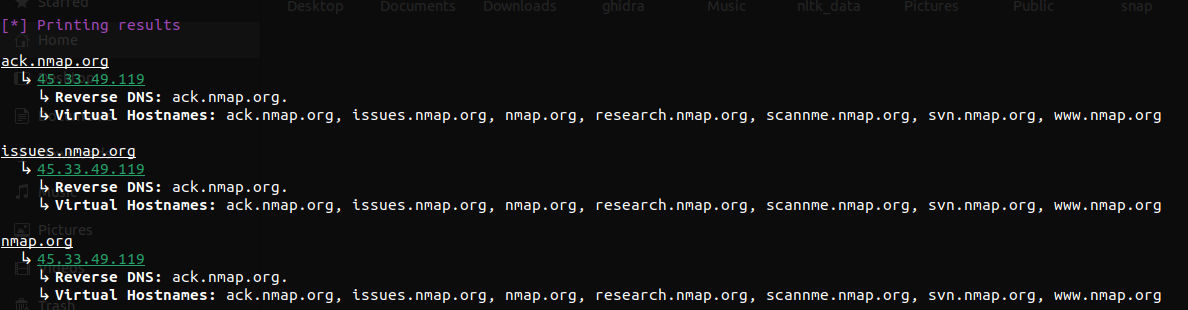
Printing as the following might've been better-
ack.nmap.org, issues.nmap.org, nmap.org, research.nmap.org, scanme.nmap.org, svn.nmap.org, www.nmap.org
  ↳ 45.33.49.119
    ↳ Reverse DNS: ack.nmap.org.
But previously while testing, I found cases where not all IPs are shared by same set of vhostnames. That is why I decided to keep it this way.
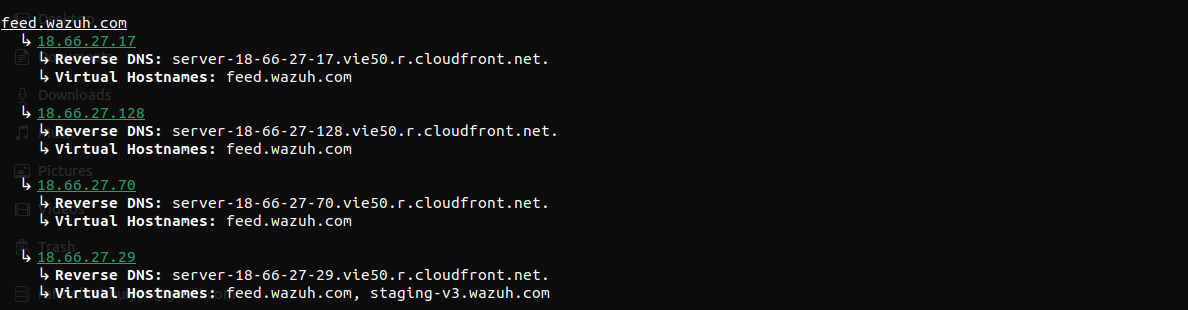
DNS server might have some sort of rate limiting. That's why I added random delays (between 0-300ms) for resolving per host, before its A and AAAA queries. This is to not make the DNS server get all the queries at once but rather in a more natural way. For bruteforcing method, the value is between 0-1000ms by default but that can be changed using --rps | -r flag.
One particular limitation that is bugging me is that the DNS resolver would not return all the IPs for a domain. So it is necessary to make multiple queries to get all (or most) of the IPs. But then again, it is not possible to know how many IPs are there for a domain. I still have to come up with a solution for this. Domains with a CNAME record are resolved to the IPv4 and IPv6 addresses of the CNAME target.
By default, bruteforcing is skipped if a possible wildcard subdomain is found. This is because, if a domain has a wildcard subdomain, bruteforcing will resolve IPv4 and IPv6 addresses for all possible subdomains. Use --force-brute | -f to bruteforce anyway. In that case, the wildcard IPs are detected first and subdomains resolving only to those IPs are discarded, so valid subdomains such as scanme.nmap.org are still found. Subdomains that share all their IPs with the wildcard record cannot be told apart from it and will be discarded as well.
Passive engines can also return names that only exist because of the wildcard record (e.g. typos that someone once queried). So, for domains with a wildcard record, subdomains that resolve only to the wildcard IPs are hidden, unless they appear in a TLS certificate (crt.sh or certspotter). The number of hidden subdomains is printed. If no certificate engine responds, nothing is hidden.
Similar thing is true for VHost enumeration for subdomain inputs. Since, urls that ends with given subdomains are returned, subdomains of similar domains are not considered. For example, scanme.nmap.org will not be printed for ack.nmap.org but something.ack.nmap.org might be. I can search for all subdomains of nmap.org but that defeats the purpose of having a subdomains as an input.
MIT License. See LICENSE for full text.