
zpgo is a Go library that reports task progress through the Zig progress
protocol. Use it to report tasks, subtasks, and progress from child processes.
zpgo requires Go 1.22 or later. Pipe reporting supports Linux, macOS, FreeBSD,
OpenBSD, NetBSD, and DragonFly BSD.
go get github.com/asciimoth/zpgoThe Zig progress protocol sends a task tree from a child process to its
parent through a pipe. Tasks have names, completed item counts, and estimated
totals. The ZIG_PROGRESS environment variable gives the pipe descriptor.
A parent can merge task trees from its children into a single progress display.
The protocol also works outside the Zig toolchain. For example,
zpg can run your Go program and display its progress in a terminal.
Use zpgo to send reports to zpg or another compatible receiver.
See Andrew Kelley's protocol specification for the protocol design.
For client libraries in other languages, see zppy (Python),
zprs (Rust), and zpjs (JavaScript).
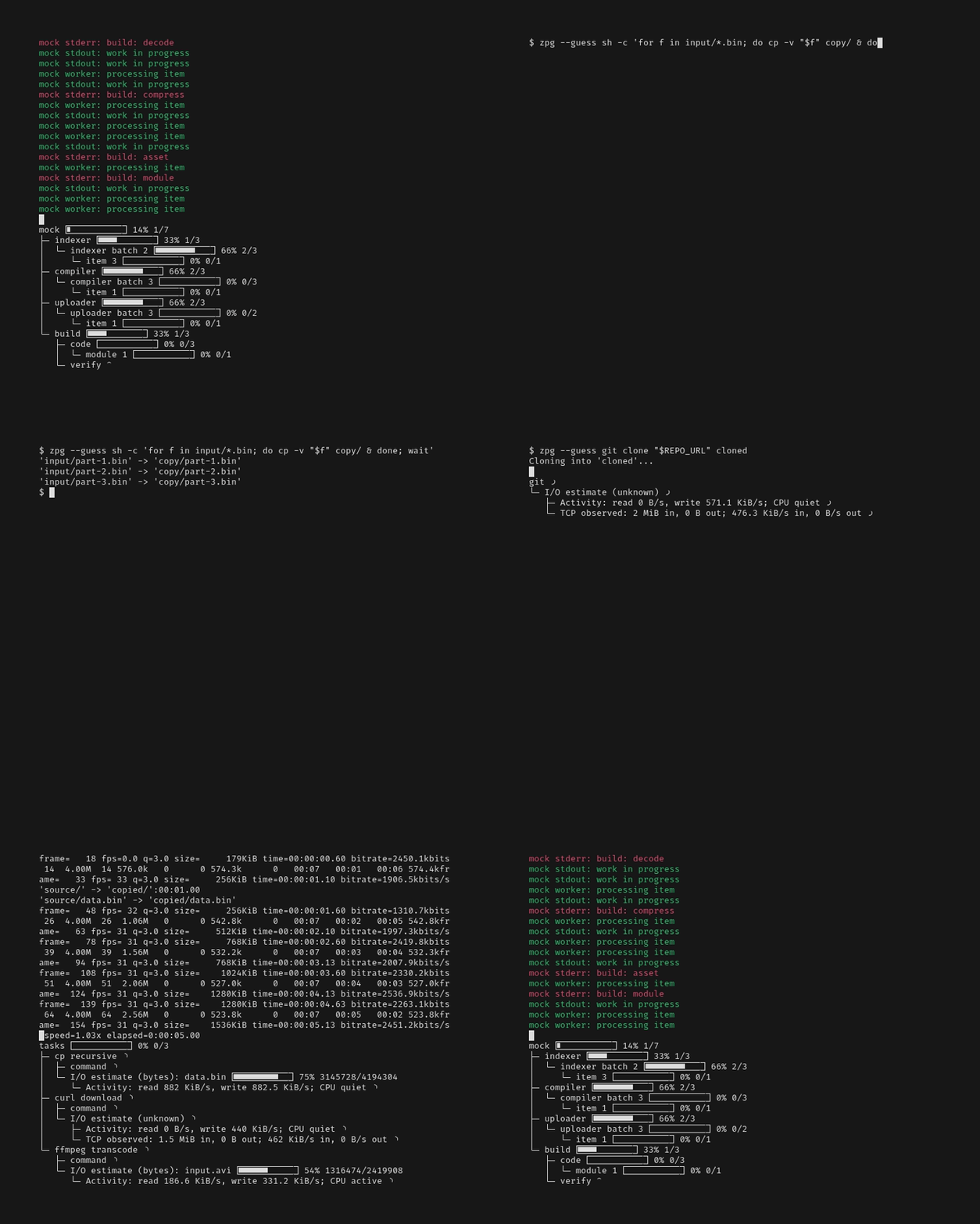
If you use this library, open an issue or send a pull request with a link to your project. This helps us track use of the Zig progress protocol outside the Zig toolchain.
Add the zig-progress-protocol topic to your GitHub repository. Use
the same tag on other platforms so people can find related projects.
Save this example as main.go in your Go module:
package main

import (
    "log"
    "time"

    "github.com/asciimoth/zpgo"
)

func main() {
    if err := run(); err != nil {
        log.Fatal(err)
    }
}

func run() error {
    p, err := zpgo.New(zpgo.Options{
        RootName:            "build",
        EstimatedTotalItems: 2,
    })
    if err != nil {
        return err
    }
    defer p.Close()

    for _, name := range []string{"assets", "code"} {
        task := p.Root().Start(name, 10)
        for i := 0; i < 10; i++ {
            time.Sleep(100 * time.Millisecond) // Replace with one item of work.
            task.CompleteOne()
        }
        task.End()
    }
    return nil
}
With zpg on PATH, build and run the program:
go build -o progress-demo .
zpg ./progress-demo
Each task can start child tasks. End removes the task and its descendants.
It then completes one item in the parent task. Do not also call the parent's
CompleteOne for the same child task. Use defer task.End() in functions that
can return before the task is complete. Ending a task does not indicate success
or failure.
By default, the library disables reporting without a usable ZIG_PROGRESS
channel. Task updates then have no effect. The library prints only if the caller
explicitly enables the local renderer described below.
Set Renderer to enable a local display when no parent receives progress:
p, err := zpgo.New(zpgo.Options{
    RootName:            "build",
    EstimatedTotalItems: 2,
    Renderer: &zpgo.RendererOptions{
        Writer: os.Stderr,
    },
})
if err != nil {
    return err
}
defer p.Close()
Use the same task methods shown above. The renderer shows a tree with progress
bars and counts. Tasks with unknown totals show a spinner. Child process reports
appear in the same tree. Close clears the display; it does not close the writer.
See the standalone example, or run it in a terminal:
go run ./examples/renderThe example runs for about eight seconds. It shows file discovery, concurrent asset and code builds, documentation, test suites, and release packaging. Nested tasks finish at different times, and discovery changes from an unknown total to a known total.
Set UNICODE_PROGRESS_BAR=true to use Fira Code bars and spinners, as in zpg.
This requires Fira Code or a font with the same progress characters. Only the
exact value true enables this style; other values use ASCII. The renderer reads
the value when New creates it.
UNICODE_PROGRESS_BAR=true go run ./examples/renderRendering is an explicit choice. It starts only if File is nil,
ZIG_PROGRESS is absent, and Disable is false. An empty, invalid, or closed
environment channel does not enable the renderer. A supplied pipe always takes
priority. A nil Renderer keeps the existing behavior.
The caller must give the renderer exclusive access to the terminal until
Close returns. Start on an empty line. Do not write logs or child process output
to that terminal while the display is active. This includes stdout and stderr
when they share a terminal. The renderer does not capture standard streams or
provide an interface for additional messages.
The writer must support ANSI cursor movement and UTF-8. A nil Writer uses
os.Stderr. No terminal check is made, so callers must omit Renderer when
output is redirected and ANSI output is unwanted. Width and Height specify
terminal dimensions in cells. Zero values use the current size of an *os.File
terminal, or 80 columns by 24 rows if its size is unavailable. The display clips
long labels and excess rows to fit. It reserves the last column and row.
Labels cannot insert terminal commands: the renderer replaces control characters,
line separators, direction controls, and invalid UTF-8 with ?.
Manual, RefreshInterval, and InitialDelay also control the renderer.
Flush redraws the tree. Renderer writes are synchronous and can block, including
during Close. A write error
8000
disables reporting and is available through Err.
Local rendering works on all platforms with a suitable writer; child progress
pipes still require a supported Unix platform.
From the root directory of this repository, run:
go build -o /tmp/zpgo-demo ./examples/demo
zpg --renderer tree /tmp/zpgo-demo
The combined example runs zpg --mock as a subprocess
and a Go worker through ForkExec. Both report progress under GO demo and
write messages to stdout and stderr. The example requires zpg on PATH and
a supported Unix platform.
Use Node.Spawn to start a command with its own progress pipe. Configure an
exec.Cmd, then call Spawn in place of cmd.Start or cmd.Run.
For example, use this function with the reporter from the first example:
func runWorker(ctx context.Context, p *zpgo.Progress) error {
    task := p.Root().Start("compile", 0)
    defer task.End()

    cmd := exec.CommandContext(ctx, "worker", "--input", "source")
    cmd.Stdout = os.Stdout
    cmd.Stderr = os.Stderr
    if err := task.Spawn(cmd); err != nil {
        return err
    }
    return cmd.Wait()
}
This function also needs the context, os, and os/exec imports. Replace
worker and its arguments with your command. In a Go worker, create a new
reporter with zpgo.New. Workers in other languages can use any compatible
protocol library.
The child's root replaces the task in reports. The child's descendants appear below that task. If the child root name is empty, the local task name stays in use. Before the first complete child report, the local task state remains visible. After the child closes its pipe or exits, its last complete tree remains until you end the task. If a child report is invalid, the reporter closes that child's pipe and keeps its last valid tree.
Wait for the process to exit, then end its task. Process exit does not end the task or indicate success or failure in the progress report. When you end a task or close a reporter, the library closes its child progress pipes. The library does not wait for or terminate the processes.
Use a separate task for each process. Processes on different tasks can run at
the same time, and child processes can start more child processes. If you
attach a second process to the same active node, the method returns
ErrProcessAttached, even after the first process exits. If a process fails
to start, the node stays available.
Automatic updates collect child reports. With Manual: true, call Flush
regularly while children run. The receiver and all reporters in the process
tree must use the same NameSize.
Spawn preserves the command's standard streams, context, directory, and
existing ExtraFiles. It copies Env and ExtraFiles to start the command.
It restores both fields before it returns. It sets ZIG_PROGRESS only in the
child environment.
Disabled, ended, and closed nodes still start processes, with ZIG_PROGRESS
removed. Do not explicitly pass the upstream descriptor to children.
On the supported Unix platforms, Node.ForkExec has the same signature as
syscall.ForkExec. It copies the process attributes and adds a private progress
pipe. It returns a process ID (PID). Wait for the child to exit, then end its
task.
The combined example shows how to start a Go worker
with ForkExec, wait with syscall.Wait4, and check the exit status.
Like syscall.ForkExec, Node.ForkExec does not search PATH for the executable.
A nil environment is empty. To inherit the environment, pass os.Environ().
Omitted file descriptors are closed. To keep the standard streams, use
Files: []uintptr{0, 1, 2}. Supply each environment key once because
syscall.ForkExec does not remove duplicate keys.
The Go runtime does not support a raw fork followed by normal Go execution.
To run a Go worker, fork and exec the current executable with a worker argument,
then create a new reporter in the worker. Nested Spawn and ForkExec calls
combine their progress trees. The parent's reporter and environment stay
unchanged.
Call zpgo.New(zpgo.Options{...}) to create a reporter, then use p.Root() to
get its root task. See the Go API documentation for full signatures.
| Option | Meaning |
|---|---|
RootName |
Root task name. |
EstimatedTotalItems |
Root task item estimate. Zero means unknown. |
File |
Writable pipe to use. If omitted, read ZIG_PROGRESS. |
Renderer |
Local display when no pipe or environment channel is set. |
Disable |
Disable reporting. |
Manual |
Disable automatic updates; use Flush to send or draw progress. |
RefreshInterval |
Time between reports. Zero uses 80 ms. |
InitialDelay |
Delay before the first report. Zero starts immediately. |
NameSize |
Name size in bytes. Default: 120. Use 40 for published format. |
Timer durations must not be negative. New returns an error for invalid
options or an unusable explicit File. A missing or unusable environment
channel disables reporting without an error.
| Reporter method | Action |
|---|---|
Root() |
Get the root task. |
Enabled() |
Check whether pipe reporting or local rendering is active. |
Flush() |
Collect child reports and send or draw the current tree. |
Err() |
Get the first permanent output error, if any. |
Close() |
Send a final report or clear the display, and free resources. |
Always close the reporter. Use defer p.Close() to release its resources when
the function returns. Ending the root task also closes the reporter. Closing
the reporter does not set completed counts to their totals.
See pipe handling for report delivery and error
handling.
| Node method | Action |
|---|---|
Start(name, total) |
Create a child task. Zero total means unknown. |
Spawn(cmd) |
Start a command and collect its progress. |
ForkExec(path, argv, attr) |
Fork and exec on supported Unix systems. |
CompleteOne() |
Add one completed item. |
Add(count) |
Add completed items. |
SetCompletedItems(count) |
Set the completed count. |
SetEstimatedTotalItems(count) |
Set the estimated total. |
IncreaseEstimatedTotalItems(count) |
Add to the estimated total. |
SetName(name) |
Change the task name. |
End() |
Remove this branch and complete one item in its parent. |
All task and reporter methods are safe for concurrent use. Repeated End calls
and updates on ended nodes have no effect. Spawn and ForkExec still start
processes on ended nodes. Do not copy a Progress. Copies of a Node value
refer to the same task. Zero values are safe and disabled. Do not modify an
exec.Cmd or its attributes while the command starts.
Names use 120 bytes by default. Set NameSize: 40 for the format in the
published specification. The formats are not wire compatible, and the
protocol does not negotiate the name size. Use the same name size for the
receiver and all child reporters.
Use one reporter per output pipe. Each report replaces the previous task tree.
Multiple writers can overwrite each other's progress or mix packet bytes. Use
Spawn or ForkExec to combine reports from separate processes through private
pipes.
Names stop at the first NUL and are shortened to the configured byte size.
Valid UTF-8 names are not split within a character. Go strings can also carry
raw name bytes. Completed counts are limited to 2^32-1. Totals are limited to
2^32-2 because Zig reserves the next value. The library reduces larger values
to these limits. Completed counts can exceed totals.
A report holds at most 253 nodes, including the root. When local capacity is
full, Start returns a node whose updates have no effect. Local tasks have
priority over imported child descendants. Ending tasks releases capacity.
Handles for ended tasks stay inactive.
Pipe reporting supports Linux, macOS, FreeBSD, OpenBSD, NetBSD, and DragonFly
BSD. On other platforms, the library disables reporting through ZIG_PROGRESS.
If you supply an explicit File on those platforms, New returns
ErrUnsupported unless you set Disable: true.
New duplicates an explicit File. The caller still owns the original file.
New sets the pipe to nonblocking mode, which also affects other copies of that
descriptor. The library marks an inherited environment descriptor as
close-on-exec but does not close it. While reporting is active, do not call
File.Fd or change the pipe's blocking mode. These operations can make Flush
and Close block on a full pipe.
Flush does not wait for pipe space. It returns ErrWouldBlock if the current
tree could not be sent in full. Try again later. The library finishes partial
packets before it sends newer packets. A permanent write error disables
reporting. Use Err to get that error.
Close tries to send a final report. It returns ErrWouldBlock if the pipe is
still full. Final delivery is not guaranteed. If your application needs to
deliver the report, retry Flush while the receiver is active before you close
the reporter.
Run just test-race for the test suite with the race detector, and just coverage
for a statement coverage report. Tests include malformed child packets, partial
reports, unsafe terminal labels, tree limits, output errors, and resource cleanup.
Run just test-fuzz 30s to fuzz each input boundary for 30 seconds with two workers.
The six targets cover packet decoding, name truncation, label rendering, tree
validation, decoded report rendering, and fragmented reports through real pipes.
The pipe target requires a supported Unix platform. Fuzz seeds also run as part
of the normal test suite. Failed fuzz inputs are saved in testdata/fuzz so they
can be kept as regression cases.
Files in this repository are distributed under the CC0 1.0 Universal license.

To the extent possible under law,
ASCIIMoth
has waived all copyright and related or neighboring rights to
zpgo.