English | Simplified Chinese
Turn your development machine into an always-on AI coding workstation.
Roam lets you connect back to your own development machine from anywhere, at any time, using a phone, tablet, or laptop. You can keep coding, run tests, watch logs, debug in a browser, and supervise Claude Code, Codex, or other AI coding agents while the real work continues on the development machine.
It solves a concrete problem: complex development work should not be broken apart by your device, network, or schedule. Your code, terminals, dev services, browser, and agents all keep running on the development machine. You can switch devices, disconnect, leave your desk, and come back to the same working scene. Unless you close them intentionally, the work on the development machine does not disappear because a local terminal exited, a browser tab closed, or a laptop lid shut.
Roam at a glance:
- Everything is organized by project: each repository becomes a mission control with its tasks, worktrees, agent formations, and activity — the overview is a battle map of what needs you across all projects.
- Remote development without losing the scene: check progress from a phone, add instructions from a tablet, take over coding from a laptop, while the working context stays on the development machine.
- Long tasks keep running: tests, builds, migrations, logs, and debugging sessions survive lid closes, network drops, and device changes.
- The workspace stays alive: terminals, services, browser state, and agent conversations remain on the development machine unless you close them.
- AI agents become manageable: describe a task on the project page and an agent starts working in an isolated worktree; Claude Code, Codex, and others can be monitored and given follow-up instructions at any time.
- Complex work can be orchestrated: race two agents on the same task, or split a goal across a swarm with dependencies, a board, and a shared feed.
Roam is not another cloud IDE. It connects to your real development machine and puts projects, terminals, browser, files, tasks, and AI agents into a remotely controllable workspace. What you see is a console; behind it is still the development environment and toolchain you already use.
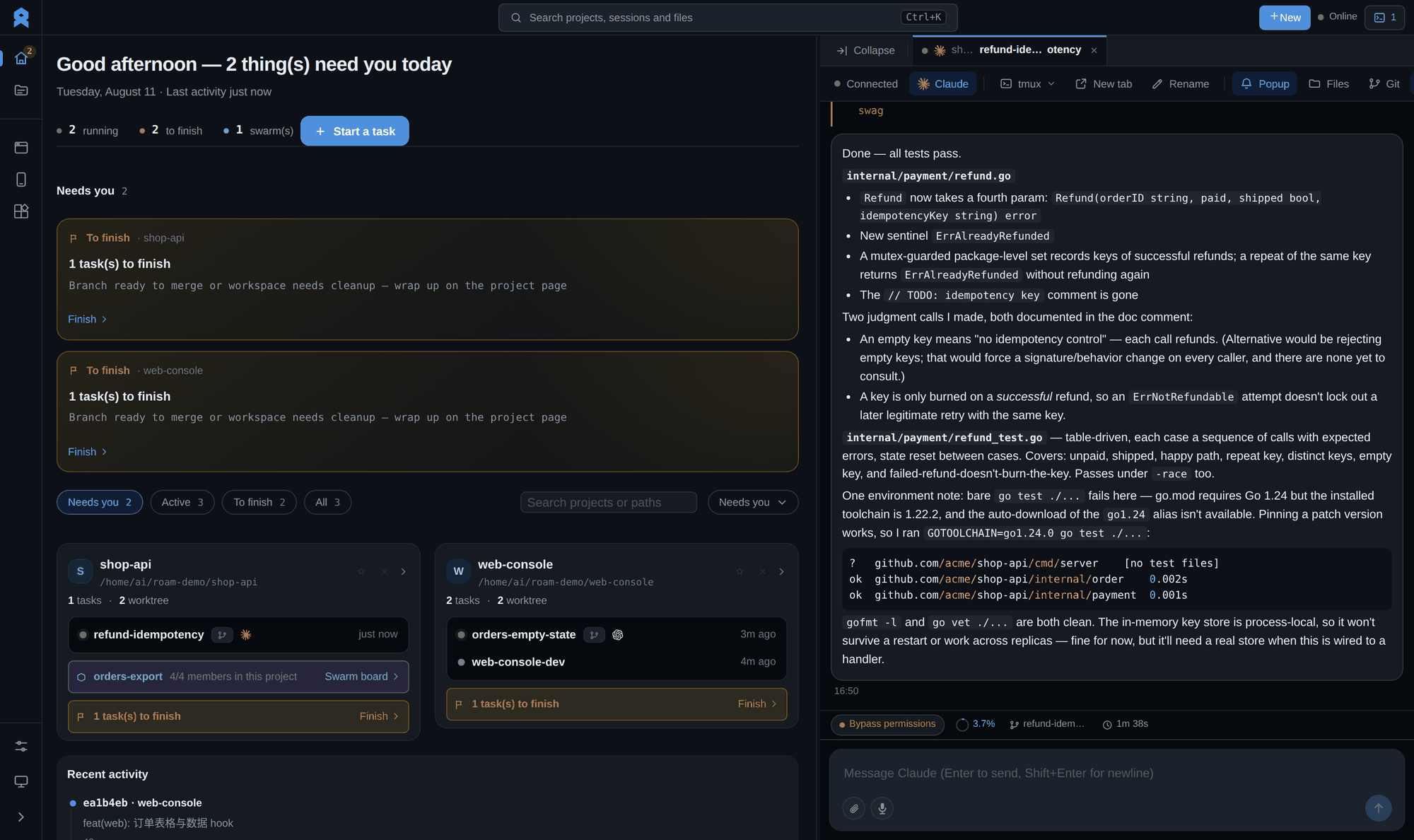
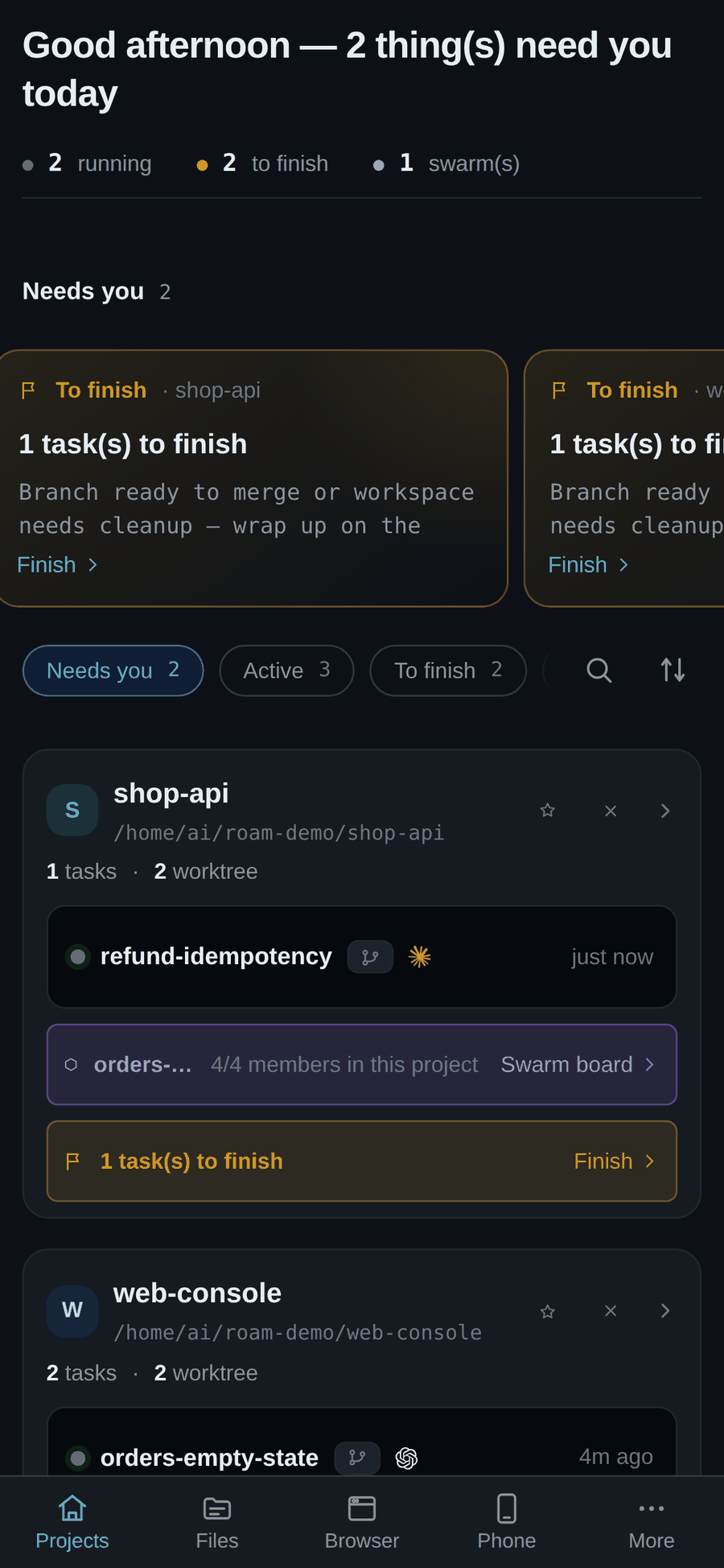
Remote access to one development machine: the desktop console and the phone show the same projects, running tasks, and live agent state.
- A project is the unit of work: sessions, tasks, worktrees, and agent formations all hang off the repository they belong to — open a project and everything about it is one screen away.
- Close the lid, the work keeps running: terminals, dev servers, tests, and agent conversations live on the development machine — a dropped network or a shut laptop never kills the scene.
- Any device is the same desk: open the Web console from a phone, tablet, or laptop and land back in the exact project you left — zero install, no native app to update.
- Long tasks don't need you watching: builds, migrations, log tailing, and agent runs keep going in the background; the overview shows which project needs input and which is still grinding.
- Describe a task, an agent takes it: type what you want on the project page, and Claude Code or Codex starts in an isolated worktree on its own branch — race two agents on the same task and keep the better result.
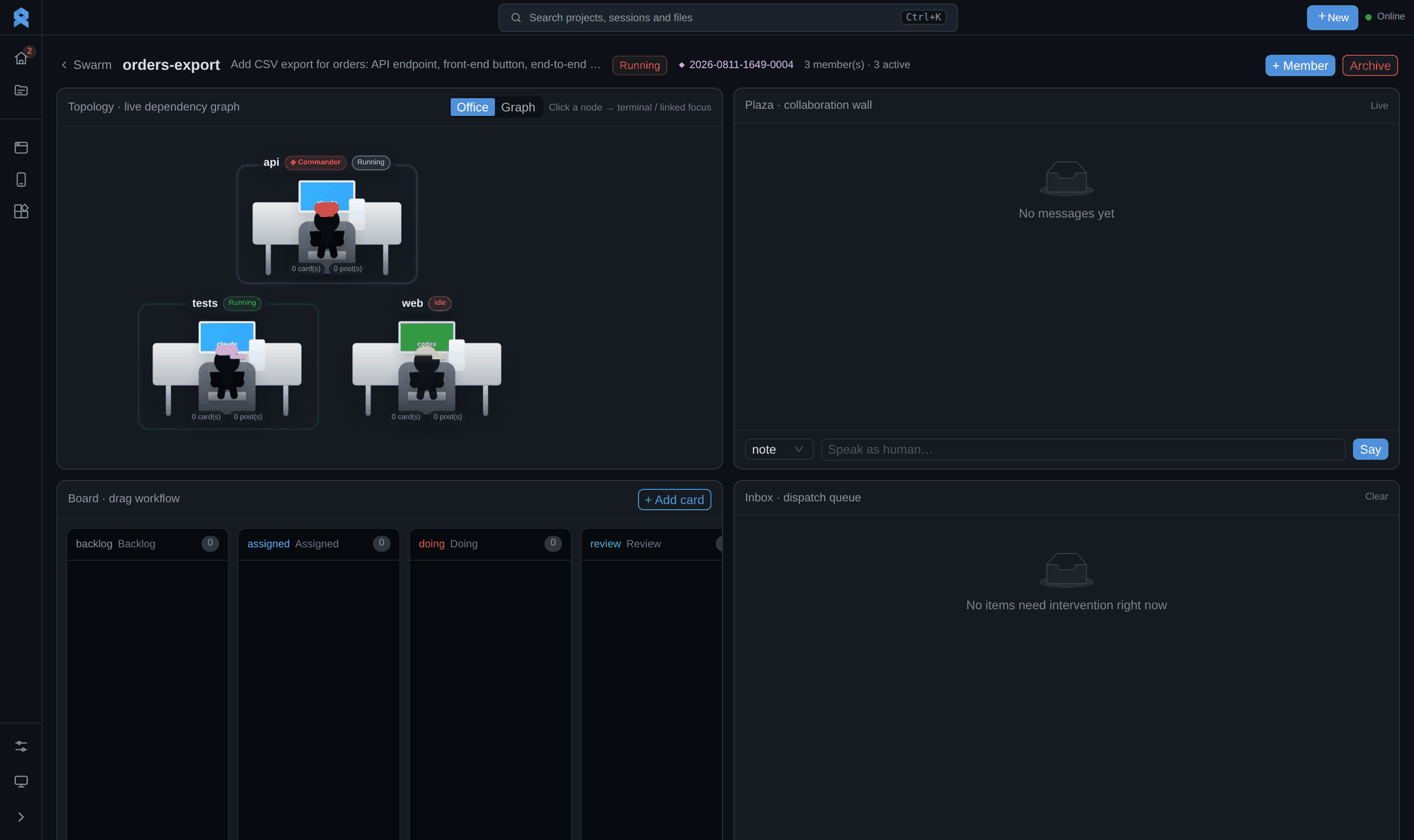
- Formations split one goal across many hands: hand the API to one member, the frontend to another, tests to a third — a shared board and message feed keep them in sync, and dependencies unlock the next step automatically.
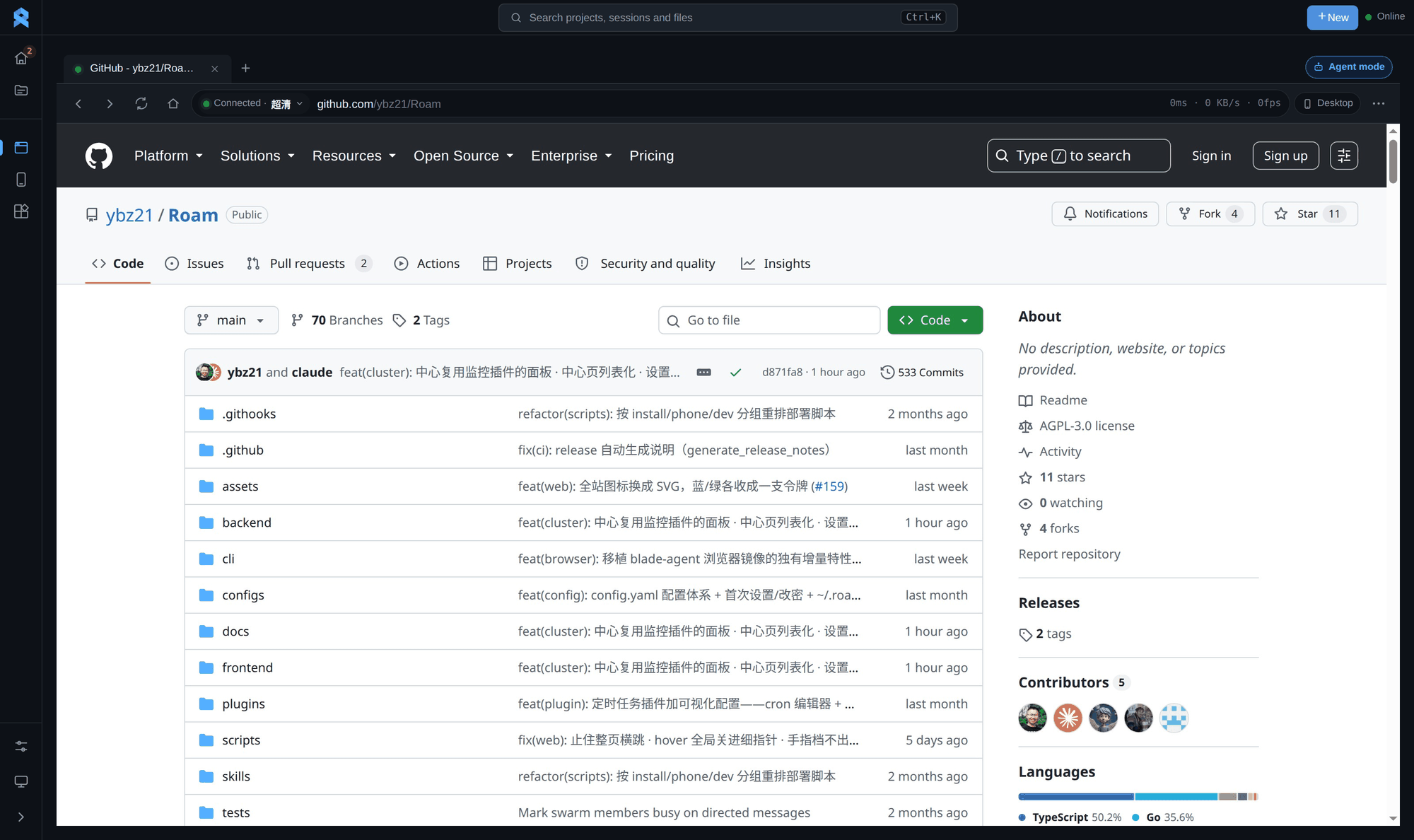
- The debugging browser lives on the dev machine too: login state, screenshots, and repro flows stay put, so remote UI debugging picks up right where it was.
- Built for humans and agents to share one workspace: take over from the Web console by hand, or let agents read state, collect output, and keep pushing.
A project is mission control. Describe a task at the top and an agent starts in an isolated worktree; below it, every running task with its agent, diff count, and state — plus Worktree, Formations, and Activity tabs for the same repository.

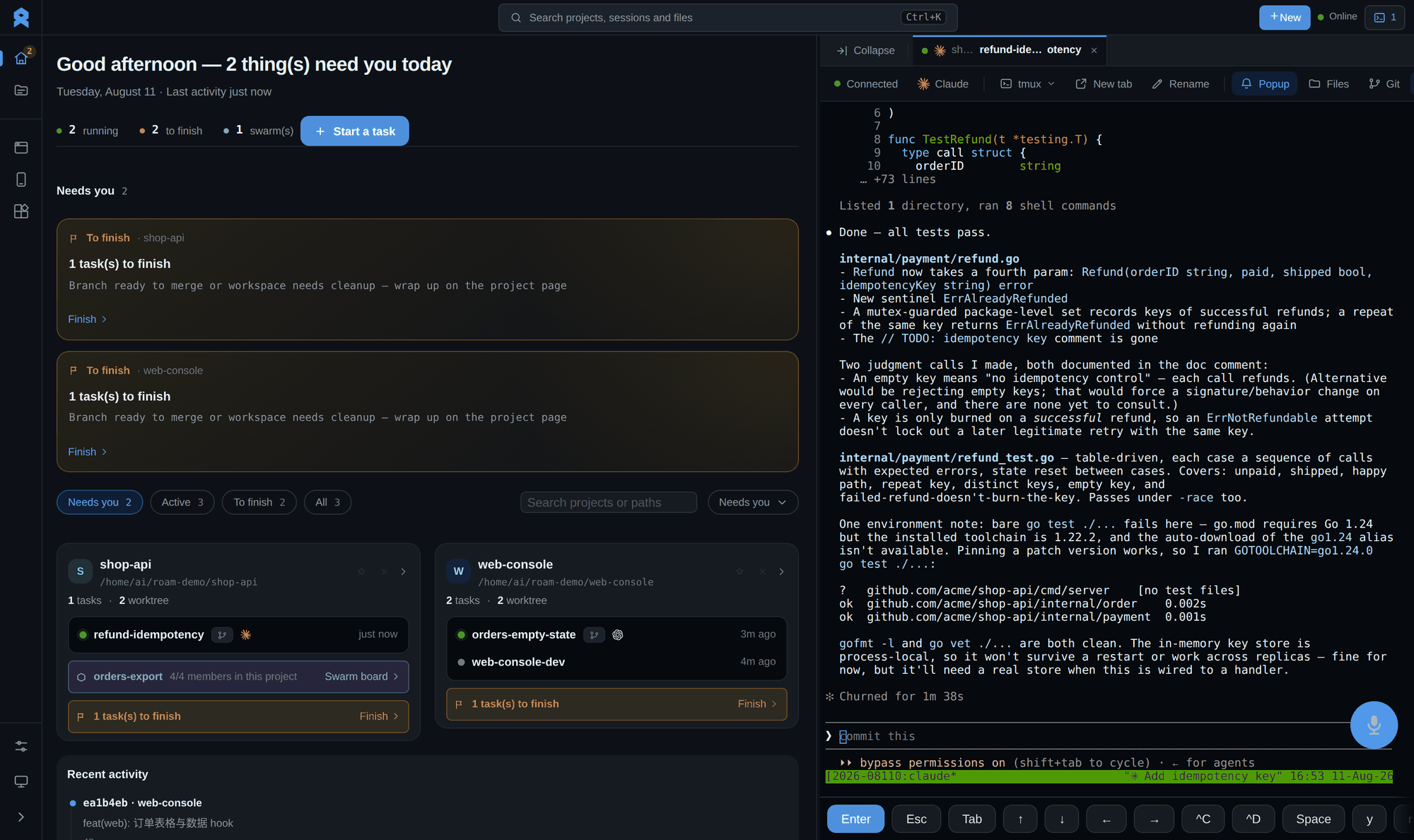
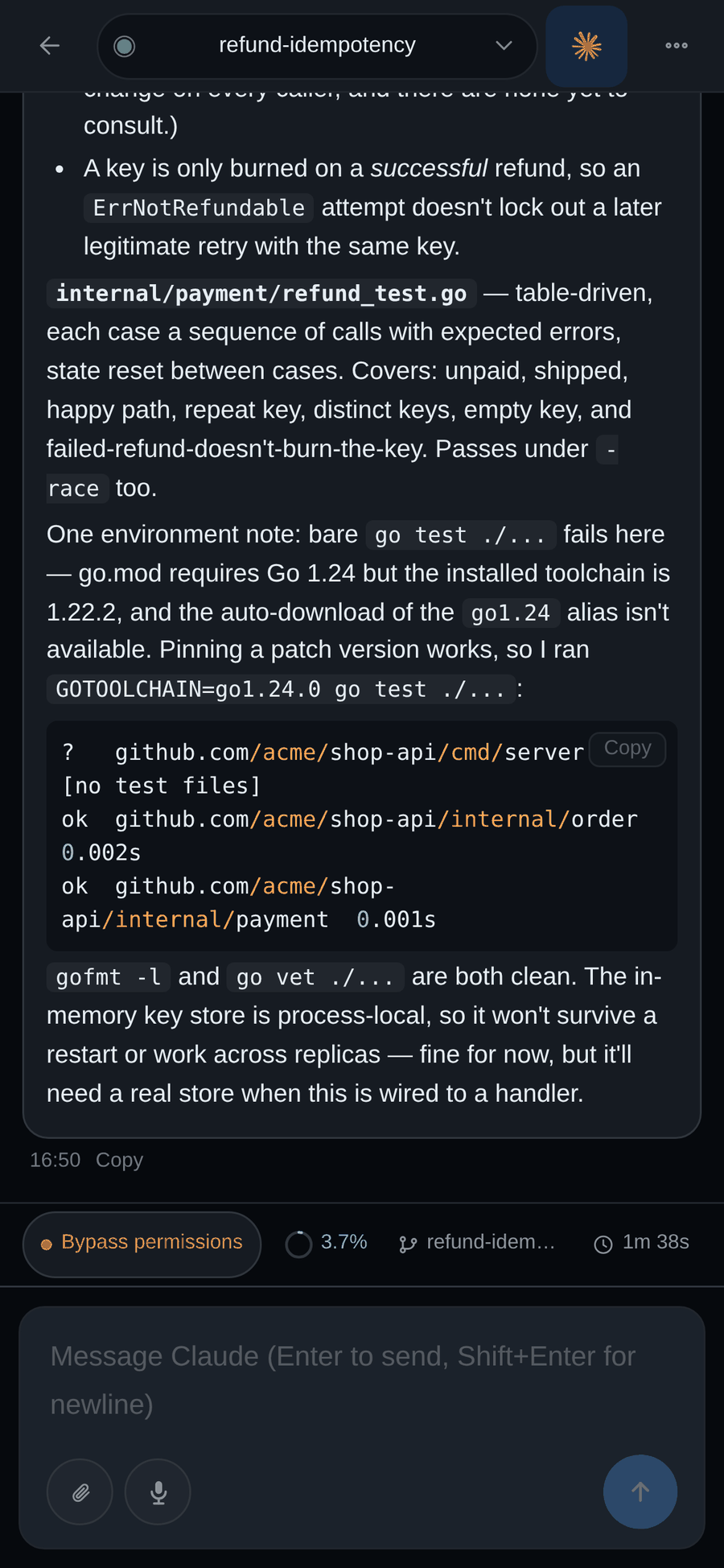
One view for the agent, its terminal, and the file tree. Watch Claude Code or Codex work, browse and open files beside it, and type on the mobile key bar when you're on a phone.
A formation, at a glance. Launched from the project's Formations tab: a live topology of every member, a shared collaboration wall (plaza), a drag-to-flow board, and an inbox of items waiting for review — a goal split across agents stays legible.
Drive a real browser from the console. The dev machine's Chrome is mirrored into the console — open tabs, navigate, click, and type. Debug a web app, keep a login session, or let an agent reproduce a flow, all on the development machine.
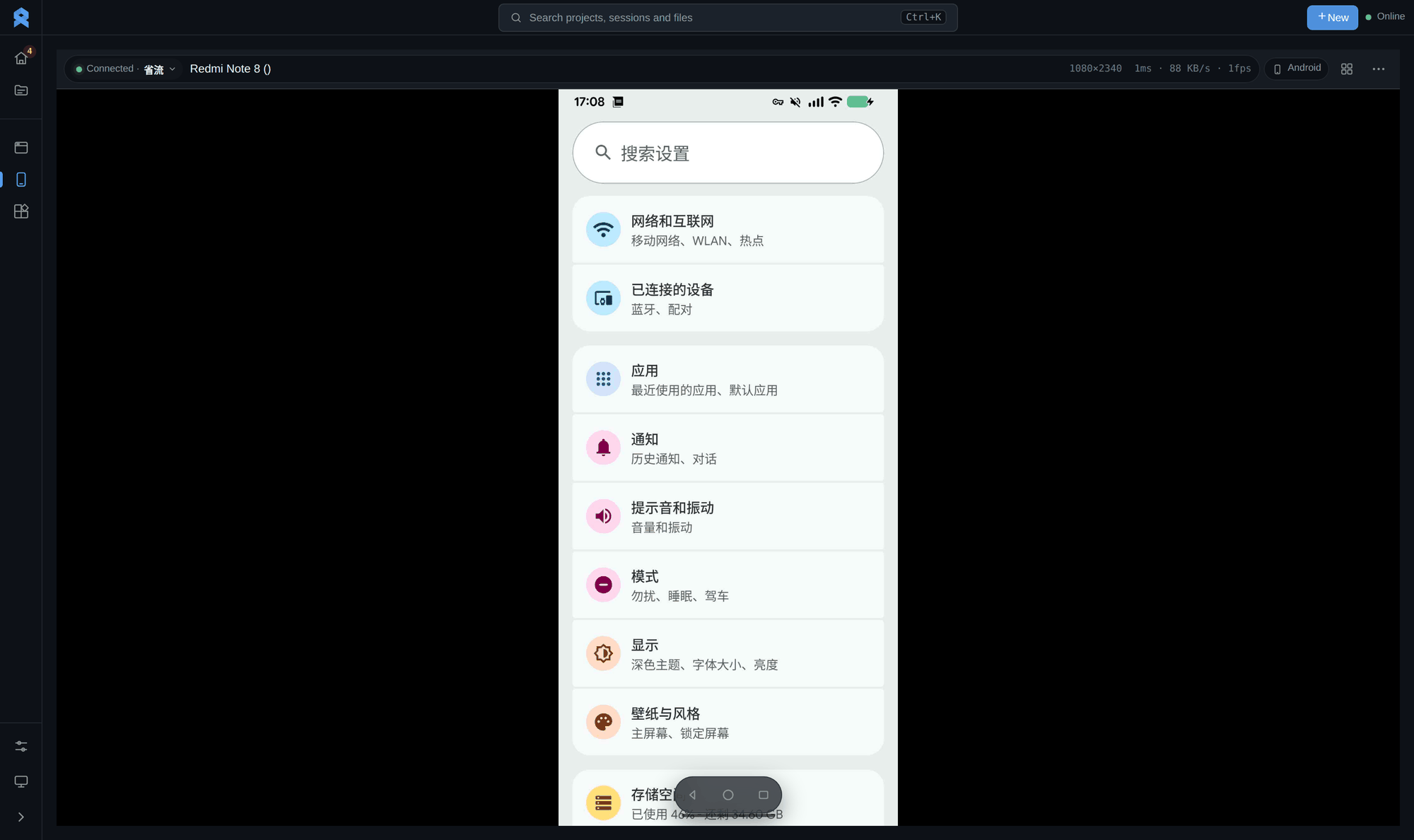
Control a real phone from the console. Mirror an Android device over adb — the live screen, streaming stats, and remote nav bar — to reproduce mobile flows or check an app right next to your terminals.
Your whole workspace fits in a phone. Open the console in any mobile browser — no app to install — and land back in the same projects, tasks, and agents. Check progress on the train, nudge an agent from the couch, take over from a café.
Talk to an agent from your phone. Open a session and chat with Claude Code or Codex right in the terminal — the mobile key bar and send button let you type follow-ups, review the reply, and keep the task moving without a laptop.
Remote development is easy for small tasks. Once the work becomes complex, it starts to hit many breakpoints:
- dev servers need to keep running
- tests, logs, and builds need multiple terminals
- browser state matters for reproducing bugs
- agents need isolated context and follow-up instructions
- long tasks should keep running while you are offline
- you need to quickly understand, per project, what is still running and what is waiting for you
Roam treats the development machine as the single real working scene. The server keeps work alive, and the Web console lets you reconnect from any device. When automation is needed, scriptable interfaces expose sessions, tasks, logs, and agent orchestration.
- Start Roam on your development machine.
- Open the Web console from a phone, tablet, or another computer.
- Open a project, enter an existing task or terminal, and continue the previous working scene.
- Describe a new task on the project page and let Claude Code, Codex, or another agent run it in an isolated worktree on the development machine.
- Leave the browser or close your local terminal; terminals, services, logs, and agents keep running on the development machine.
- Come back later from any device: the overview shows which projects need input, and each project page shows where its tasks got to.
Roam is not mainly "one more terminal tool." It turns the development machine into a continuously available workspace. The terminals, running services, debugging browser, AI agent conversations, and task state on that machine do not vanish just because a local device shut down, SSH disconnected, or a browser tab closed.
roam is a single self-contained binary with the frontend and the ttmux CLI
embedded, so the target machine needs no go/node/npm. Config and data live in
~/.roam/ (config.yaml is generated on first run).
One line downloads the binary and registers it as a persistent systemd service (survives reboots and logout):
curl -fsSL https://raw.githubusercontent.com/ybz21/Roam/main/install.sh | bashinstall.sh installs roam into ~/.local/bin and sets up a user service —
manage it with systemctl --user {status|restart|stop} roam. Env switches:
ROAM_VERSION=vX.Y.Z, ROAM_BIN_DIR=DIR, ROAM_SYSTEM=1 (system-wide service,
needs sudo), ROAM_NO_SERVICE=1 (install the binary only).
Grab the build for your OS/arch from the Releases page and run it directly (no service — good for macOS or a quick try):
# example: Linux x86_64
curl -fsSL -o ~/.local/bin/roam \
  https://github.com/ybz21/Roam/releases/latest/download/roam-linux-amd64
chmod +x ~/.local/bin/roam
roam # starts the Web console on 0.0.0.0:13579git clone https://github.com/ybz21/Roam.git
cd Roam
./start.sh --dev # build CLI/chrome/skills + frontend + backend from source, then runstart.sh also supports stop / status / logs / fg; plain ./start.sh
runs already-built artifacts without recompiling.
On first launch there is no password: open the Web console in a browser and
set one before entering. Change it later under Settings → Change password, or
edit ~/.roam/config.yaml. By default the console listens on 0.0.0.0:13579
(self-signed HTTPS), so devices on the same LAN can reach it. For remote access,
prefer Tailscale, Cloudflare Tunnel, SSH forwarding, or frp.
Exposing Roam through frp with HTTPS so mobile voice input and clipboard continue to work through the tunnel is covered in docs/deploy/frp.md (bilingual).
Full installation, deployment, remote access, and command-line automation notes live in docs/install/.
If Claude Code, Codex, or another command-line coding tool is installed on the development machine, the project page is the fastest way to use it: describe a task and the agent starts in an isolated worktree on its own branch, so parallel tasks never step on each other. You can also race Claude Code and Codex on the same task and keep the better result, or run any tool directly inside a persistent Roam terminal. Execution, output, context, and the follow-up channel all stay on the development machine — when you return from a phone or tablet, you can inspect where it got to and add more instructions.
For more complex work, launch a formation from the project's Formations tab: a swarm splits the goal across multiple members — one handles the API, one the frontend, one tests. A shared board and message feed synchronize progress, and dependencies unlock the next step when earlier work is done.
Roam also provides command-line entry points for scripts, automation, and AI agents. This is not the main entry point for most users; start from the Web console in most cases.
ttmux: manages persistent sessions, background tasks, agent workers, swarms, and machine-readable state.chrome: drives Chrome on the development machine for UI debugging, screenshots, form flows, and automated validation.
Command details are intentionally not expanded on the home page, so the README
does not become a tool manual. When needed, see
docs/install/, ttmux help, and chrome help.
Install the repository Git hooks once per clone:
bash scripts/dev/install-git-hooks.shThe pre-commit hook runs the quick quality gate. CI runs the full gate on pushes and pull requests:
scripts/dev/quality/check.sh quick
scripts/dev/quality/check.sh full
Build and run the Web console:
./start.sh --dev fgFrontend only:
cd frontend
npm install
npm run dev
Backend only:
cd backend
TTMUX_BIN=../ttmux TTMUX_WEB_PASSWORD=dev go run ./cmd
CLI smoke test:
TTMUX=./ttmux bash tests/test_ttmux.shRoam can control your development machine's terminal, files, browser, and agents. Treat it as close to SSH access. For real deployments:
- Use a strong access password, and enable two-factor authentication when needed.
- Prefer Tailscale, Cloudflare Tunnel, SSH forwarding, or frp for external access.
- Do not expose the Web console port directly to the public Internet.
- Run it only on machines and accounts you trust.
- docs/features.md - full feature list
- docs/install/ - installation and deployment
- docs/design/ - design docs for swarm orchestration, plaza boards, and Web integration
- backend/README.md - backend implementation details
GNU Affero General Public License v3.0 (AGPL-3.0). See LICENSE.