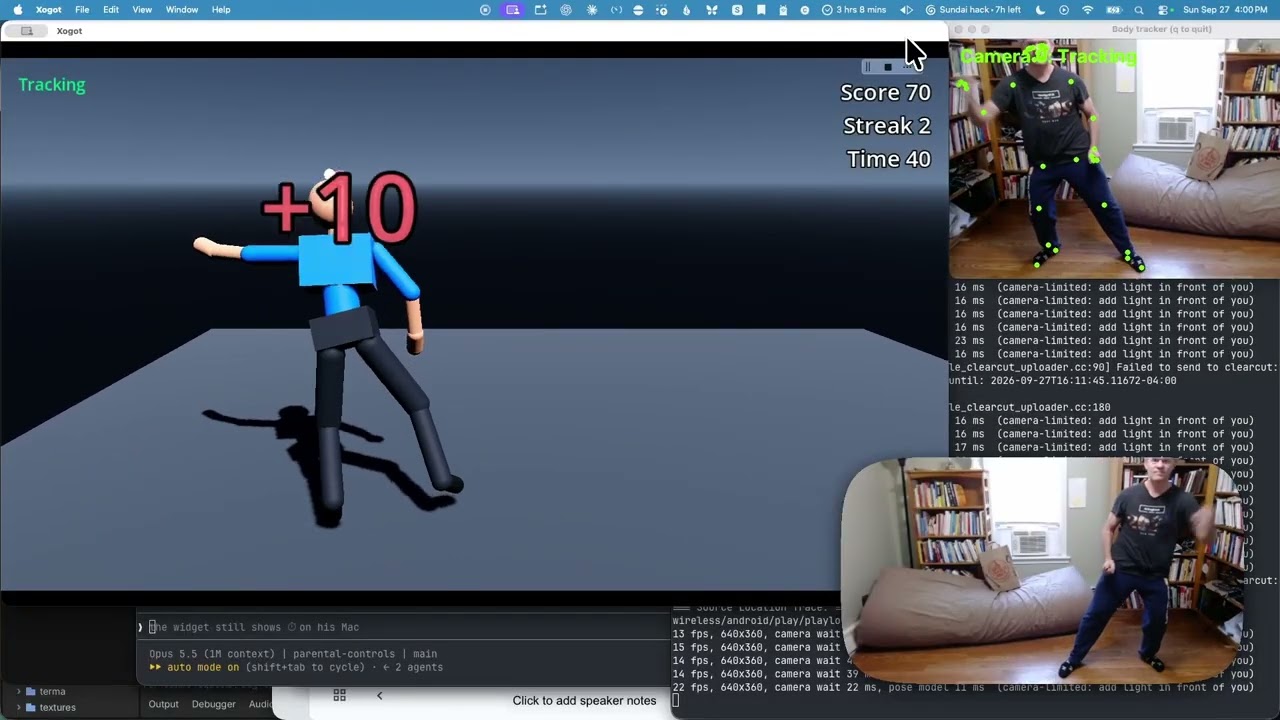
This prototype was built during the Build a Video Game with your Child workshop, offered through the Nerdy Parents Club of Cambridge. It was made with Xogot, a Mac-friendly version of Godot, the open source game engine.
webcam → tracker/tracker.py (MediaPipe Pose) → UDP 127.0.0.1:4242 → pose_receiver.gd (Godot)
-
Open this project in Xogot and press Play. The main scene is
body3d.tscn(3D rigged mannequin);main.tscnis the 2D stick-figure/gesture demo. -
In a terminal:
cd tracker
uv run tracker.py
The first run downloads Google's pose model (~6 MB) and macOS asks for camera permission for your terminal app. Stand back so your upper body and hips are in frame.
uv run tracker.py --testsends a fake animated pose (no camera) for testing the Godot side.--camera 1picks another camera,--no-previewhides the webcam window.- If tracking stutters or drops out while Xogot is in front, macOS App Nap is throttling the
tracker because its preview window is covered. Run with
--no-preview, or keep part of the preview window visible. The tracker prints its frame rate every 5 seconds.
mannequin.gdbuilds aSkeleton3D(Hips → Spine → Chest → Neck → Head, arms, hands, legs, feet) in a T-pose facing the camera, with a capsule attached to each bone.pose_driver_3d.gduses MediaPipe's 3D world landmarks (meters, hip-centered): hips/chest/head get a full orientation from the hip, shoulder and ear lines, and every limb bone is swung to point along your matching limb. It works like a mirror.- Limbs that are out of view relax back to the rest pose. Tune
smoothing,follow_sidewaysandsideways_rangeon the root node.
Raise both hands above your head (or press Space) to start a 60-second round. Balls fly
at the character; touch them with an arm, hand, leg or foot to score. Every 5 hits in a row
adds a bonus. Balls get faster and more frequent as the round goes on. See ball_game.gd.
Sounds: a hit plays a soft thump plus a glass chime that climbs in pitch with your streak;
a miss plays an error tone. They come from Kenney's
Impact Sounds and
Interface Sounds packs, CC0 (sfx/Kenney_*_License.txt).
The game opens on a menu. Hold your left hand above your head for about a second to pick
the Ball Game, or your right hand for Ping Pong (or click a card / press 1 or 2).
Press Esc in any game to come back to the menu. See game_menu.gd.
You hold a paddle in your right hand at the near end of a regulation table; a CPU plays the far end and serves every point. Raise both hands (or press Space) to start; first to 11 wins.
- Simplified table-tennis rules: the ball must bounce once on the other side. Hitting the net, hitting it out, or letting it bounce twice on your side loses the point.
- Touching the ball with the paddle is enough: returns are aim-assisted over the net, since webcam tracking is only ~15 fps. Swinging sideways steers the shot and swinging fast makes it faster, and the CPU misses fast shots more often.
- The table (
ping_pong/ping_pong_table.tscn) and paddle (ping_pong/paddle.tscn) were built with the Xogot Modeler: regulation 2.74 × 1.525 m top at 76 cm with beveled edges, 2 cm edge lines and a 3 mm center line, a 15.25 cm net with posts and clamps, and a metal under-frame with legs and rubber feet. - Game logic is in
ping_pong/ping_pong_game.gd. Table bounce and paddle sounds are from Kenney's Impact Sounds pack (CC0).
- On mixamo.com pick a character → Download → FBX Binary, T-pose.
- Save it in
characters/(e.g.characters/Amy.fbx). That folder is git-ignored, since Mixamo's license doesn't allow redistributing the raw character files. - Set
character_sceneon theBody3Droot node to the .fbx (andcharacter_scaleif the character is small or large). The Mannequin is hidden automatically.
The driver recognizes Mixamo bone names (mixamorig_LeftArm, …) with any prefix.
- Lean your torso left/right → the blue block walks.
- Both hands above your head → jump.
Tune LEAN_THRESHOLD, MOVE_SPEED, etc. at the top of pose_receiver.gd.
-
The project uses the Compatibility renderer. Skinned meshes (like Mixamo characters) don't render in the running game with it under Xogot; the Mobile renderer fixes that, but Xogot's embedded game view then shows only a zoomed-in quarter of the screen.
-
mediapipeis pinned<1: version 1.0.1 crashes on macOS when creating the PoseLandmarker ("Check failed: service_ Service is unavailable"). -
Landmark indices follow MediaPipe's 33-point pose model (0 nose, 11/12 shoulders, 13/14 elbows, 15/16 wrists, 23/24 hips, 25/26 knees, 27/28 ankles).