Never stop coding. Auto-route to FREE & cheap AI models with smart fallback.
Free AI Provider for OpenClaw.



Stop wasting money and hitting limits:
- ❌ Subscription quota expires unused every month
- ❌ Rate limits stop you mid-coding
- ❌ Expensive APIs ($20-50/month per provider)
- ❌ Manual switching between providers
9Router solves this:
- ✅ Maximize subscriptions - Track quota, use every bit before reset
- ✅ Auto fallback - Subscription → Cheap → Free, zero downtime
- ✅ Multi-account - Round-robin between accounts per provider
- ✅ Universal - Works with Claude Code, Codex, Gemini CLI, Cursor, Cline, any CLI tool
┌─────────────┐
│  Your CLI   │  (Claude Code, Codex, Gemini CLI, OpenClaw, Cursor, Cline...)
│   Tool      │
└──────┬──────┘
       │ http://localhost:20128/v1
       ↓
┌─────────────────────────────────────────┐
│           9Router (Smart Router)        │
│  • Format translation (OpenAI ↔ Claude) │
│  • Quota tracking                       │
│  • Auto token refresh                   │
└──────┬──────────────────────────────────┘
       │
       ├─→ [Tier 1: SUBSCRIPTION] Claude Code, Codex, Gemini CLI
       │   ↓ quota exhausted
       ├─→ [Tier 2: CHEAP] GLM ($0.6/1M), MiniMax ($0.2/1M)
       │   ↓ budget limit
       └─→ [Tier 3: FREE] iFlow, Qwen, Kiro (unlimited)

Result: Never stop coding, minimal cost
1. Install globally:
npm install -g 9router
9router
🎉 Dashboard opens at http://localhost:20128
2. Connect a FREE provider (no signup needed):
Dashboard → Providers → Connect Claude Code or Antigravity → OAuth login → Done!
3. Use in your CLI tool:
Claude Code/Codex/Gemini CLI/OpenClaw/Cursor/Cline Settings:
  Endpoint: http://localhost:20128/v1
  API Key: [copy from dashboard]
  Model: if/kimi-k2-thinking
That's it! Start coding with FREE AI models.
Alternative: run from source (this repository):
This repository package is private (9router-app), so source/Docker execution is the expected local development path.
cp .env.example .env
npm install
PORT=20128 NEXT_PUBLIC_BASE_URL=http://localhost:20128 npm run dev
Production mode:
npm run build
PORT=20128 HOSTNAME=0.0.0.0 NEXT_PUBLIC_BASE_URL=http://localhost:20128 npm run start
Default URLs:
- Dashboard:
http://localhost:20128/dashboard - OpenAI-compatible API:
http://localhost:20128/v1

🎬 Watch the complete step-by-step tutorial:
- ✅ 9Router installation & setup
- ✅ FREE Claude Sonnet 4.5 configuration
- ✅ Claude Code integration
- ✅ Live coding demonstration
⏱️ Duration: 20 minutes | 👥 By: Developer Community
| Feature | What It Does | Why It Matters |
|---|---|---|
| 🎯 Smart 3-Tier Fallback | Auto-route: Subscription → Cheap → Free | Never stop coding, zero downtime |
| 📊 Real-Time Quota Tracking | Live token count + reset countdown | Maximize subscription value |
| 🔄 Format Translation | OpenAI ↔ Claude ↔ Gemini seamless | Works with any CLI tool |
| 👥 Multi-Account Support | Multiple accounts per provider | Load balancing + redundancy |
| 🔄 Auto Token Refresh | OAuth tokens refresh automatically | No manual re-login needed |
| 🎨 Custom Combos | Create unlimited model combinations | Tailor fallback to your needs |
| 📝 Request Logging | Debug mode with full request/response logs | Troubleshoot issues easily |
| 💾 Cloud Sync | Sync config across devices | Same setup everywhere |
| 📊 Usage Analytics | Track tokens, cost, trends over time | Optimize spending |
| 🌐 Deploy Anywhere | Localhost, VPS, Docker, Cloudflare Workers | Flexible deployment options |
📖 Feature Details
Create combos with automatic fallback:
Combo: "my-coding-stack"
  1. cc/claude-opus-4-6        (your subscription)
  2. glm/glm-4.7               (cheap backup, $0.6/1M)
  3. if/kimi-k2-thinking       (free fallback)

→ Auto switches when quota runs out or errors occur
- Token consumption per provider
- Reset countdown (5-hour, daily, weekly)
- Cost estimation for paid tier 8BD0 s
- Monthly spending reports
Seamless translation between formats:
- OpenAI ↔ Claude ↔ Gemini ↔ OpenAI Responses
- Your CLI tool sends OpenAI format → 9Router translates → Provider receives native format
- Works with any tool that supports custom OpenAI endpoints
- Add multiple accounts per provider
- Auto round-robin or priority-based routing
- Fallback to next account when one hits quota
- OAuth tokens automatically refresh before expiration
- No manual re-authentication needed
- Seamless experience across all providers
- Create unlimited model combinations
- Mix subscription, cheap, and free tiers
- Name your combos for easy access
- Share combos across devices with Cloud Sync
- Enable debug mode for full request/response logs
- Track API calls, headers, and payloads
- Troubleshoot integration issues
- Export logs for analysis
- Sync providers, combos, and settings across devices
- Automatic background sync
- Secure encrypted storage
- Access your setup from anywhere
- Prefer server-side cloud variables in production:
BASE_URL(internal callback URL used by sync scheduler)CLOUD_URL(cloud sync endpoint base)
NEXT_PUBLIC_BASE_URLandNEXT_PUBLIC_CLOUD_URLare still supported for compatibility/UI, but server runtime now prioritizesBASE_URL/CLOUD_URL.- Cloud sync requests now use timeout + fail-fast behavior to avoid UI hanging when cloud DNS/network is unavailable.
- Track token usage per provider and model
- Cost estimation and spending trends
- Monthly reports and insights
- Optimize your AI spending
💡 IMPORTANT - Understanding Dashboard Costs:
The "cost" displayed in Usage Analytics is for tracking and comparison purposes only. 9Router itself never charges you anything. You only pay providers directly (if using paid services).
Example: If your dashboard shows "$290 total cost" while using iFlow models, this represents what you would have paid using paid APIs directly. Your actual cost = $0 (iFlow is free unlimited).
Think of it as a "savings tracker" showing how much you're saving by using free models or routing through 9Router!
- 💻 Localhost - Default, works offline
- ☁️ VPS/Cloud - Share across devices
- 🐳 Docker - One-command deployment
- 🚀 Cloudflare Workers - Global edge network
| Tier | Provider | Cost | Quota Reset | Best For |
|---|---|---|---|---|
| 💳 SUBSCRIPTION | Claude Code (Pro) | $20/mo | 5h + weekly | Already subscribed |
| Codex (Plus/Pro) | $20-200/mo | 5h + weekly | OpenAI users | |
| Gemini CLI | FREE | 180K/mo + 1K/day | Everyone! | |
| GitHub Copilot | $10-19/mo | Monthly | GitHub users | |
| 💰 CHEAP | GLM-4.7 | $0.6/1M | Daily 10AM | Budget backup |
| MiniMax M2.1 | $0.2/1M | 5-hour rolling | Cheapest option | |
| Kimi K2 | $9/mo flat | 10M tokens/mo | Predictable cost | |
| 🆓 FREE | iFlow | $0 | Unlimited | 8 models free |
| Qwen | $0 | Unlimited | 3 models free | |
| Kiro | $0 | Unlimited | Claude free |
💡 Pro Tip: Start with Gemini CLI (180K free/month) + iFlow (unlimited free) combo = $0 cost!
9Router Billing Reality:
✅ 9Router software = FREE forever (open source, never charges)
✅ Dashboard "costs" = Display/tracking only (not actual bills)
✅ You pay providers directly (subscriptions or API fees)
✅ FREE providers stay FREE (iFlow, Kiro, Qwen = $0 unlimited)
❌ 9Router never sends invoices or charges your card
How Cost Display Works:
The dashboard shows estimated costs as if you were using paid APIs directly. This is not billing - it's a comparison tool to show your savings.
Example Scenario:
Dashboard Display:
• Total Requests: 1,662
• Total Tokens: 47M
• Display Cost: $290

Reality Check:
• Provider: iFlow (FREE unlimited)
• Actual Payment: $0.00
• What $290 Means: Amount you SAVED by using free models!
Payment Rules:
- Subscription providers (Claude Code, Codex): Pay them directly via their websites
- Cheap providers (GLM, MiniMax): Pay them directly, 9Router just routes
- FREE providers (iFlow, Kiro, Qwen): Genuinely free forever, no hidden charges
- 9Router: Never charges anything, ever
Problem: Quota expires unused, rate limits during heavy coding
Solution:
Combo: "maximize-claude"
  1. cc/claude-opus-4-6        (use subscription fully)
  2. glm/glm-4.7               (cheap backup when quota out)
  3. if/kimi-k2-thinking       (free emergency fallback)

Monthly cost: $20 (subscription) + ~$5 (backup) = $25 total
vs. $20 + hitting limits = frustration
Problem: Can't afford subscriptions, need reliable AI coding
Solution:
Combo: "free-forever"
  1. gc/gemini-3-flash         (180K free/month)
  2. if/kimi-k2-thinking       (unlimited free)
  3. qw/qwen3-coder-plus       (unlimited free)

Monthly cost: $0
Quality: Production-ready models
Problem: Deadlines, can't afford downtime
Solution:
Combo: "always-on"
  1. cc/claude-opus-4-6        (best quality)
  2. cx/gpt-5.2-codex          (second subscription)
  3. glm/glm-4.7               (cheap, resets daily)
  4. minimax/MiniMax-M2.1      (cheapest, 5h reset)
  5. if/kimi-k2-thinking       (free unlimited)

Result: 5 layers of fallback = zero downtime
Monthly cost: $20-200 (subscriptions) + $10-20 (backup)
Problem: Need AI assistant in messaging apps (WhatsApp, Telegram, Slack...), completely free
Solution:
Combo: "openclaw-free"
  1. if/glm-4.7                (unlimited free)
  2. if/minimax-m2.1           (unlimited free)
  3. if/kimi-k2-thinking       (unlimited free)

Monthly cost: $0
Access via: WhatsApp, Telegram, Slack, Discord, iMessage, Signal...
📊 Why does my dashboard show high costs?
The dashboard tracks your token usage and displays estimated costs as if you were using paid APIs directly. This is not actual billing - it's a reference to show how much you're saving by using free models or existing subscriptions through 9Router.
Example:
- Dashboard shows: "$290 total cost"
- Reality: You're using iFlow (FREE unlimited)
- Your actual cost: $0.00
- What $290 means: Amount you saved by using free models instead of paid APIs!
The cost display is a "savings tracker" to help you understand your usage patterns and optimization opportunities.
💳 Will I be charged by 9Router?
No. 9Router is free, open-source software that runs on your own computer. It never charges you anything.
You only pay:
- ✅ Subscription providers (Claude Code $20/mo, Codex $20-200/mo) → Pay them directly on their websites
- ✅ Cheap providers (GLM, MiniMax) → Pay them directly, 9Router just routes your requests
- ❌ 9Router itself → Never charges anything, ever
9Router is a local proxy/router. It doesn't have your credit card, can't send invoices, and has no billing system. It's completely free software.
🆓 Are FREE providers really unlimited?
Yes! Providers marked as FREE (iFlow, Kiro, Qwen) are genuinely unlimited with no hidden charges.
These are free services offered by those respective companies:
- iFlow: Free unlimited access to 8+ models via OAuth
- Kiro: Free unlimited Claude models via AWS Builder ID
- Qwen: Free unlimited access to Qwen models via device auth
9Router just routes your requests to them - there's no "catch" or future billing. They're truly free services, and 9Router makes them easy to use with fallback support.
Note: Some subscription providers (Antigravity, GitHub Copilot) may have free preview periods that could become paid later, but this would be clearly announced by those providers, not 9Router.
💰 How do I minimize my actual AI costs?
Free-First Strategy:
-
Start with 100% free combo:
1. gc/gemini-3-flash (180K/month free from Google)
2. if/kimi-k2-thinking (unlimited free from iFlow)
3. qw/qwen3-coder-plus (unlimited free from Qwen)
Cost: $0/month
-
Add cheap backup only if you need it:
4. glm/glm-4.7 ($0.6/1M tokens)Additional cost: Only pay for what you actually use
-
Use subscription providers last:
- Only if you already have them
- 9Router helps maximize their value through quota tracking
Result: Most users can operate at $0/month using only free tiers!
📈 What if my usage suddenly spikes?
9Router's smart fallback prevents surprise charges:
Scenario: You're on a coding sprint and blow through your quotas
Without 9Router:
- ❌ Hit rate limit → Work stops → Frustration
- ❌ Or: Accidentally rack up huge API bills
With 9Router:
- ✅ Subscription hits limit → Auto-fallback to cheap tier
- ✅ Cheap tier gets expensive → Auto-fallback to free tier
- ✅ Never stop coding → Predictable costs
You're in control: Set spending limits per provider in dashboard, and 9Router respects them.
🔐 Subscription Providers (Maximize Value)
Dashboard → Providers → Connect Claude Code
→ OAuth login → Auto token refresh
→ 5-hour + weekly quota tracking

Models:
  cc/claude-opus-4-6
  cc/claude-sonnet-4-5-20250929
  cc/claude-haiku-4-5-20251001
Pro Tip: Use Opus for complex tasks, Sonnet for speed. 9Router tracks quota per model!
Dashboard → Providers → Connect Codex
→ OAuth login (port 1455)
→ 5-hour + weekly reset

Models:
  cx/gpt-5.2-codex
cx/gpt-5.1-codex-maxDashboard → Providers → Connect Gemini CLI
→ Google OAuth
→ 180K completions/month + 1K/day
Models:
gc/gemini-3-flash-preview
gc/gemini-2.5-proBest Value: Huge free tier! Use this before paid tiers.
Dashboard → Providers → Connect GitHub
→ OAuth via GitHub
→ Monthly reset (1st of month)

Models:
  gh/gpt-5
  gh/claude-4.5-sonnet
  gh/gemini-3-pro
💰 Cheap Providers (Backup)
- Sign up: Zhipu AI
- Get API key from Coding Plan
- Dashboard → Add API Key:
- Provider:
glm - API Key:
your-key
- Provider:
Use: glm/glm-4.7
Pro Tip: Coding Plan offers 3× quota at 1/7 cost! Reset daily 10:00 AM.
- Sign up: MiniMax
- Get API key
- Dashboard → Add API Key
Use: minimax/MiniMax-M2.1
Pro Tip: Cheapest option for long context (1M tokens)!
- Subscribe: Moonshot AI
- Get API key
- Dashboard → Add API Key
Use: kimi/kimi-latest
Pro Tip: Fixed $9/month for 10M tokens = $0.90/1M effective cost!
🆓 FREE Providers (Emergency Backup)
Dashboard → Connect iFlow
→ iFlow OAuth login
→ Unlimited usage

Models:
  if/kimi-k2-thinking
  if/qwen3-coder-plus
  if/glm-4.7
  if/minimax-m2
if/deepseek-r1Dashboard → Connect Qwen
→ Device code authorization
→ Unlimited usage
Models:
qw/qwen3-coder-plus
qw/qwen3-coder-flashDashboard → Connect Kiro
→ AWS Builder ID or Google/GitHub
→ Unlimited usage
Models:
kr/claude-sonnet-4.5
kr/claude-haiku-4.5🎨 Create Combos
Dashboard → Combos → Create New

Name: premium-coding
Models:
  1. cc/claude-opus-4-6 (Subscription primary)
  2. glm/glm-4.7 (Cheap backup, $0.6/1M)
  3. minimax/MiniMax-M2.1 (Cheapest fallback, $0.20/1M)

Use in CLI: premium-coding

Monthly cost example (100M tokens):
  80M via Claude (subscription): $0 extra
  15M via GLM: $9
  5M via MiniMax: $1
  Total: $10 + your subscription
Name: free-combo
Models:
  1. gc/gemini-3-flash-preview (180K free/month)
  2. if/kimi-k2-thinking (unlimited)
  3. qw/qwen3-coder-plus (unlimited)

Cost: $0 forever!
🔧 CLI Integration
Settings → Models → Advanced:
  OpenAI API Base URL: http://localhost:20128/v1
  OpenAI API Key: [from 9router dashboard]
  Model: cc/claude-opus-4-6
Or use combo: premium-coding
Edit ~/.claude/config.json:
{
  "anthropic_api_base": "http://localhost:20128/v1",
  "anthropic_api_key": "your-9router-api-key"
}export OPENAI_BASE_URL="http://localhost:20128"
export OPENAI_API_KEY="your-9router-api-key"
codex "your prompt"Option 1 — Dashboard (recommended):
Dashboard → CLI Tools → OpenClaw → Select Model → Apply
Option 2 — Manual: Edit ~/.openclaw/openclaw.json:
{
  "agents": {
    "defaults": {
      "model": {
        "primary": "9router/if/glm-4.7"
      }
    }
  },
  "models": {
    "providers": {
      "9router": {
        "baseUrl": "http://127.0.0.1:20128/v1",
        "apiKey": "sk_9router",
        "api": "openai-completions",
        "models": [
          {
            "id": "if/glm-4.7",
            "name": "glm-4.7"
          }
        ]
      }
    }
  }
}
Note: OpenClaw only works with local 9Router. Use
127.0.0.1instead oflocalhostto avoid IPv6 resolution issues.
Provider: OpenAI Compatible
Base URL: http://localhost:20128/v1
API Key: [from dashboard]
Model: cc/claude-opus-4-6
🚀 Deployment
# Clone and install
git clone https://github.com/decolua/9router.git
cd 9router
npm install
npm run build

# Configure
export JWT_SECRET="your-secure-secret-change-this"
export INITIAL_PASSWORD="your-password"
export DATA_DIR="/var/lib/9router"
export PORT="20128"
export HOSTNAME="0.0.0.0"
export NODE_ENV="production"
export NEXT_PUBLIC_BASE_URL="http://localhost:20128"
export NEXT_PUBLIC_CLOUD_URL="https://9router.com"
export API_KEY_SECRET="endpoint-proxy-api-key-secret"
export MACHINE_ID_SALT="endpoint-proxy-salt"

# Start
npm run start

# Or use PM2
npm install -g pm2
pm2 start npm --name 9router -- start
pm2 save
pm2 startup# Build image (from repository root)
docker build -t 9router .
# Run container (command used in current setup)
docker run -d \
--name 9router \
-p 20128:20128 \
--env-file /root/dev/9router/.env \
-v 9router-data:/app/data \
-v 9router-usage:/root/.9router \
9routerPortable command (if you are already at repository root):
docker run -d \
  --name 9router \
  -p 20128:20128 \
  --env-file ./.env \
  -v 9router-data:/app/data \
  -v 9router-usage:/root/.9router \
  9router
Container defaults:
PORT=20128HOSTNAME=0.0.0.0
Useful commands:
docker logs -f 9router
docker restart 9router
docker stop 9router && docker rm 9router| Variable | Default | Description |
|---|---|---|
JWT_SECRET |
9router-default-secret-change-me |
JWT signing secret for dashboard auth cookie (change in production) |
INITIAL_PASSWORD |
123456 |
First login password when no saved hash exists |
DATA_DIR |
~/.9router |
Main app database location (db.json) |
PORT |
framework default | Service port (20128 in examples) |
HOSTNAME |
framework default | Bind host (Docker defaults to 0.0.0.0) |
NODE_ENV |
runtime default | Set production for deploy |
BASE_URL |
http://localhost:20128 |
Server-side internal base URL used by cloud sync jobs |
CLOUD_URL |
https://9router.com |
Server-side cloud sync endpoint base URL |
NEXT_PUBLIC_BASE_URL |
http://localhost:3000 |
Backward-compatible/public base URL (prefer BASE_URL for server runtime) |
NEXT_PUBLIC_CLOUD_URL |
https://9router.com |
Backward-compatible/public cloud URL (prefer CLOUD_URL for server runtime) |
API_KEY_SECRET |
endpoint-proxy-api-key-secret |
HMAC secret for generated API keys |
MACHINE_ID_SALT |
endpoint-proxy-salt |
Salt for stable machine ID hashing |
ENABLE_REQUEST_LOGS |
false |
Enables request/response logs under logs/ |
AUTH_COOKIE_SECURE |
false |
Force Secure auth cookie (set true behind HTTPS reverse proxy) |
REQUIRE_API_KEY |
false |
Enforce Bearer API key on /v1/* routes (recommended for internet-exposed deploys) |
HTTP_PROXY, HTTPS_PROXY, ALL_PROXY, NO_PROXY |
empty | Optional outbound proxy for upstream provider calls |
Notes:
- Lowercase proxy variables are also supported:
http_proxy,https_proxy,all_proxy,no_proxy. .envis not baked into Docker image (.dockerignore); inject runtime config with--env-fileor-e.- On Windows,
APPDATAcan be used for local storage path resolution. INSTANCE_NAMEappears in older docs/env templates, but is currently not used at runtime.
- Main app state:
${DATA_DIR}/db.json(providers, combos, aliases, keys, settings), managed bysrc/lib/localDb.js. - Usage history and logs:
~/.9router/usage.jsonand~/.9router/log.txt, managed bysrc/lib/usageDb.js. - Optional request/translator logs:
<repo>/logs/...whenENABLE_REQUEST_LOGS=true. - Usage storage currently follows
~/.9routerpath logic and is independent fromDATA_DIR.
View all available models
Claude Code (cc/) - Pro/Max:
cc/claude-opus-4-6cc/claude-sonnet-4-5-20250929cc/claude-haiku-4-5-20251001
Codex (cx/) - Plus/Pro:
cx/gpt-5.2-codexcx/gpt-5.1-codex-max
Gemini CLI (gc/) - FREE:
gc/gemini-3-flash-previewgc/gemini-2.5-pro
GitHub Copilot (gh/):
gh/gpt-5gh/claude-4.5-sonnet
GLM (glm/) - $0.6/1M:
glm/glm-4.7
MiniMax (minimax/) - $0.2/1M:
minimax/MiniMax-M2.1
iFlow (if/) - FREE:
if/kimi-k2-thinkingif/qwen3-coder-plusif/deepseek-r1
Qwen (qw/) - FREE:
qw/qwen3-coder-plusqw/qwen3-coder-flash
Kiro (kr/) - FREE:
kr/claude-sonnet-4.5kr/claude-haiku-4.5
"Language model did not provide messages"
- Provider quota exhausted → Check dashboard quota tracker
- Solution: Use combo fallback or switch to cheaper tier
Rate limiting
- Subscription quota out → Fallback to GLM/MiniMax
- Add combo:
cc/claude-opus-4-6 → glm/glm-4.7 → if/kimi-k2-thinking
OAuth token expired
- Auto-refreshed by 9Router
- If issues persist: Dashboard → Provider → Reconnect
High costs
- Check usage stats in Dashboard
- Switch primary model to GLM/MiniMax
- Use free tier (Gemini CLI, iFlow) for non-critical tasks
Dashboard opens on wrong port
- Set
PORT=20128andNEXT_PUBLIC_BASE_URL=http://localhost:20128
Cloud sync errors
- Verify
BASE_URLpoints to your running instance (example:http://localhost:20128) - Verify
CLOUD_URLpoints to your expected cloud endpoint (example:https://9router.com) - Keep
NEXT_PUBLIC_*values aligned with server-side values when possible.
Cloud endpoint stream=false returns 500 (Unexpected token 'd'...)
- Symptom usually appears on public cloud endpoint (
https://9router.com/v1) for non-streaming calls. - Root cause: upstream returns SSE payload (
data: ...) while client expects JSON. - Workaround: use
stream=truefor cloud direct calls. - Local 9Router runtime includes SSE→JSON fallback for non-streaming calls when upstream returns
text/event-stream.
Cloud says connected, but request still fails with Invalid API key
- Create a fresh key from local dashboard (
/api/keys) and run cloud sync (Enable CloudthenSync Now). - Old/non-synced keys can still return
401on cloud even if local endpoint works.
First login not working
- Check
INITIAL_PASSWORDin.env - If unset, fallback password is
123456
No request logs under logs/
- Set
ENABLE_REQUEST_LOGS=true
- Runtime: Node.js 20+
- Framework: Next.js 16
- UI: React 19 + Tailwind CSS 4
- Database: LowDB (JSON file-based)
- Streaming: Server-Sent Events (SSE)
- Auth: OAuth 2.0 (PKCE) + JWT + API Keys
POST http://localhost:20128/v1/chat/completions
Authorization: Bearer your-api-key
Content-Type: application/json

{
  "model": "cc/claude-opus-4-6",
  "messages": [
    {"role": "user", "content": "Write a function to..."}
  ],
  "stream": true
}GET http://localhost:20128/v1/models
Authorization: Bearer your-api-key
→ Returns all models + combos in OpenAI formatPOST /v1/chat/completionsPOST /v1/messagesPOST /v1/responsesGET /v1/modelsPOST /v1/messages/count_tokensGET /v1beta/modelsPOST /v1beta/models/{...path}(Gemini-stylegenerateContent)POST /v1/api/chat(Ollama-style transform path)
Added test scripts under tester/security/:
tester/security/test-docker-hardening.sh- Builds Docker image and validates hardening checks (
/api/cloud/authauth guard,REQUIRE_API_KEY, secure auth cookie behavior).
- Builds Docker image and validates hardening checks (
tester/security/test-cloud-openai-compatible.sh- Sends a direct OpenAI-compatible request to cloud endpoint (
https://9router.com/v1/chat/completions) with provided model/key.
- Sends a direct OpenAI-compatible request to cloud endpoint (
tester/security/test-cloud-sync-and-call.sh- End-to-end flow: create local key -> enable/sync cloud -> call cloud endpoint with retry.
- Includes fallback check with
stream=trueto distinguish auth errors from non-streaming parse issues.
Security note for cloud test scripts:
- Never hardcode real API keys in scripts/commits.
- Provide keys only via environment variables:
API_KEY,CLOUD_API_KEY, orOPENAI_API_KEY(supported bytest-cloud-openai-compatible.sh)
- Example:
OPENAI_API_KEY="your-cloud-key" bash tester/security/test-cloud-openai-compatible.shExpected behavior from recent validation:
- Local runtime (
http://127.0.0.1:20128/v1/chat/completions): works withstream=falseandstream=true. - Docker runtime (same API path exposed by container): hardening checks pass, cloud auth guard works, strict API key mode works when enabled.
- Public cloud endpoint (
https://9router.com/v1/chat/completions):stream=true: expected to succeed (SSE chunks returned).stream=false: may fail with500+ parse error (Unexpected token 'd') when upstream returns SSE content to a non-streaming client path.
- Auth/settings:
/api/auth/login,/api/auth/logout,/api/settings,/api/settings/require-login - Provider management:
/api/providers,/api/providers/[id],/api/providers/[id]/test,/api/providers/[id]/models,/api/providers/validate,/api/provider-nodes* - OAuth flows:
/api/oauth/[provider]/[action](+ provider-specific imports like Cursor/Kiro) - Routing config:
/api/models/alias,/api/combos*,/api/keys*,/api/pricing - Usage/logs:
/api/usage/history,/api/usage/logs,/api/usage/request-logs,/api/usage/[connectionId] - Cloud sync:
/api/sync/cloud,/api/sync/initialize,/api/cloud/* - CLI helpers:
/api/cli-tools/claude-settings,/api/cli-tools/codex-settings,/api/cli-tools/droid-settings,/api/cli-tools/openclaw-settings
- Dashboard routes (
/dashboard/*) useauth_tokencookie protection. - Login uses saved password hash when present; otherwise it falls back to
INITIAL_PASSWORD. requireLogincan be toggled via/api/settings/require-login.
- Client sends request to
/v1/*. - Route handler calls
handleChat(src/sse/handlers/chat.js). - Model is resolved (direct provider/model or alias/combo resolution).
- Credentials are selected from local DB with account availability filtering.
handleChatCore(open-sse/handlers/chatCore.js) detects format and translates request.- Provider executor sends upstream request.
- Stream is translated back to client format when needed.
- Usage/logging is recorded (
src/lib/usageDb.js). - Fallback applies on provider/account/model errors according to combo rules.
Full architecture reference: docs/ARCHITECTURE.md
- Website: 9router.com
- GitHub: github.com/decolua/9router
- Issues: github.com/decolua/9router/issues
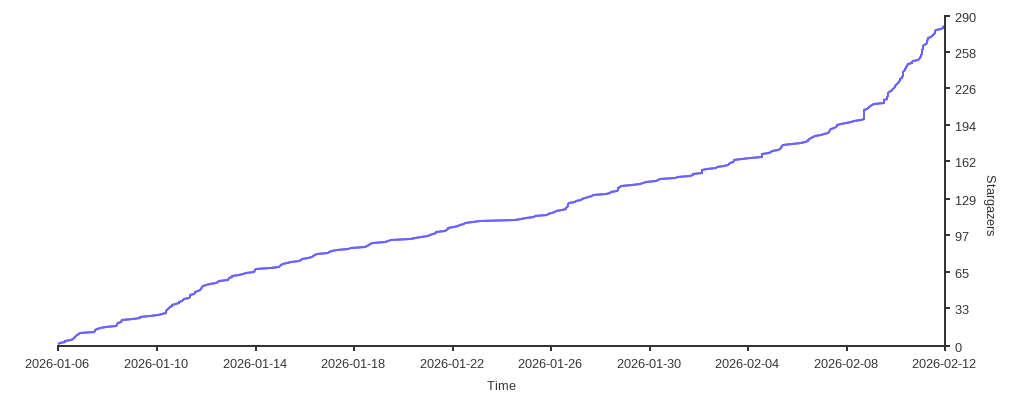
Thanks to all contributors who helped make 9Router better!
- Fork the repository
- Create your feature branch (
git checkout -b feature/amazing-feature) - Commit your changes (
git commit -m 'Add amazing feature') - Push to the branch (
git push origin feature/amazing-feature) - Open a Pull Request
See CONTRIBUTING.md for detailed guidelines.
OmniRoute — A full-featured TypeScript fork of 9Router. Adds 36+ providers, 4-tier auto-fallback, multi-modal APIs (images, embeddings, audio, TTS), circuit breaker, semantic cache, LLM evaluations, and a polished dashboard. 368+ unit tests. Available via npm and Docker.
Special thanks to CLIProxyAPI - the original Go implementation that inspired this JavaScript port.
MIT License - see LICENSE for details.