Kadajah's ZoomTools: Advanced Camera & Zoom System for RPG Maker MZ
A downloadable tool
Kadajah's ZoomTools: Advanced Camera & Zoom System
Smooth Zooms. Target Tracking. Visual Impact.
Kadajah’s Dynamic Lens transforms the static, rigid camera of RPG Maker MZ into a fluid, cinematic tool. It introduces a complete overhaul of the zoom system, adding smooth easing transitions, dynamic target tracking, and interactive mouse controls.
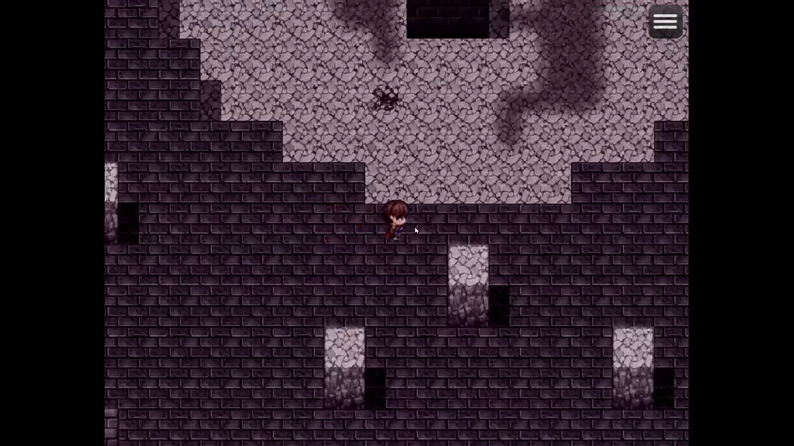
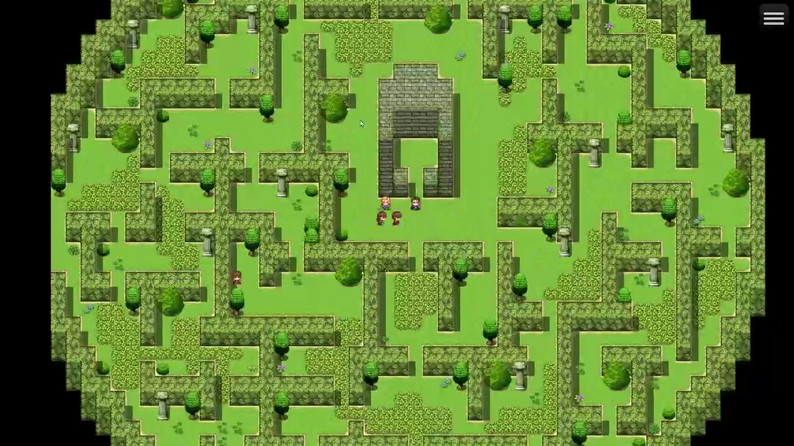
Standard RPG Maker zoom is linear and restrictive. This plugin unlocks the camera, allowing you to focus purely on storytelling and gameplay. Perhaps most importantly, it solves the engine's native rendering limitation: The Zoom-Out Fix. When scaling below 1.0x, this plugin automatically calculates and expands the map rendering area to eliminate the "black borders" that usually plague zoomed-out views.
Update v1.6: The plugin has evolved from a standard zoom controller into a comprehensive visual suite, introducing a WebGL-powered Magnifying Glass with customizable shapes (Round, Square, Hexagon) and animated shader effects.
Significant enhancements include the addition of six dynamic visual filters for the lens, such as Night Vision, Thermal, X-Ray, and Glass with chromatic aberration, along with time-based animations for noise and scanlines.
The update also improves interactivity by implementing mouse panning via the middle button, refining camera tracking logic, and optimizing lens centering to ensure smoother visual transitions and greater player control.
Features: Cinematic Control
Target Tracking System Stop manually calculating screen coordinates. The camera can now dynamically lock onto targets with a single command.
- Target Player: The classic view, but with smooth scaling.
- Target Event: Perfect for cutscenes. Lock the camera onto an NPC, a moving vehicle, or a boss monster.
- Target Screen: Focus on specific X,Y coordinates to show a point of interest or a hidden clue.
The "Infinite Map" Rendering Fix In default RPG Maker, zooming out (scaling < 1.0) shrinks the map image, revealing black void space around the edges. Kadajah’s Dynamic Lens intercepts the rendering process. If you zoom out, the plugin automatically instructs the engine to draw more tiles beyond the screen edge, ensuring the map always fills the player's view seamlessly.
Built-in Mouse Scrolling Give players control. Users can use the mouse scroll wheel to zoom in and out smoothly during gameplay. This is fully configurable—you can adjust the speed, the smoothing duration, or disable it entirely via a Switch during cutscenes.
Zoom Punch Add weight to your action. The "Zoom Punch" command creates a rapid, elastic zoom-in/zoom-out effect. This is essential for emphasizing impacts, explosions, jump scares, or critical hits in battle animations.
Controls & Configuration
The system is designed to be highly customizable via Plugin Parameters and easy-to-use Plugin Commands.
Parameter Setup
- Start Scale: Define the default zoom level when the game boots.
- Scroll Settings: Adjust the sensitivity and smoothness of the mouse wheel.
- Limits: Set hard caps for Minimum and Maximum zoom to prevent players from breaking the game view.
Plugin Commands
- Set Target: The core command. Choose a target (Player, Event ID, or Screen X/Y), set the desired scale, and set the duration. The camera handles the rest.
- Set Zoom (Manual): Change the scale smoothly without changing the current target.
- Zoom Punch: Trigger a rapid impact effect with a specific peak scale and duration.
- Reset Zoom: Instantly or smoothly returns the camera to 1.0x scale and refocuses on the player.
Creative Gameplay Mechanics
Kadajah's Dynamic Lens allows for directing techniques usually reserved for 3D engines:
The Dramatic Close-Up: During dialogue, target the Event ID of the speaker and zoom to 1.5x or 2.0x. This creates intimacy and highlights character expressions without needing a separate bust-image plugin.
Tactical Battlefield View: For Strategy RPGs or stealth sections, allow the player to zoom out to 0.5x. The rendering fix ensures they can see the entire layout of the fortress or dungeon floor at once without visual glitches.
Impact Feedback: When a trap triggers or a heavy object falls, use Zoom Punch. A quick 15-frame punch adds a visceral "thud" sensation that sound effects alone cannot convey.
Investigation & Point-and-Click: Combine Mouse Scrolling with touch input. Let players zoom in on desks, bookshelves, or maps to find small details hidden in the tile art.
Perfect Game Examples
- Cinematic RPGs: Games that rely heavily on cutscenes and character interaction.
- Tactical/Strategy Games: Where seeing the "big picture" of the map is vital.
- Horror Games: Using slow zooms to create claustrophobia, or rapid zooms for scares.
- Detective/Mystery: Searching for clues in the environment.
Compatibility
- Rendering: This plugin modifies Game_Screen and Spriteset_Map to handle the rendering fix. It is generally compatible with lighting plugins, but place this plugin high in your load order.
- Mouse Systems: Compatible with standard mouse input. Can be disabled via Switch if it conflicts with custom UI mouse controls.
Terms of Use
- Free for commercial and non-commercial projects.
- Credit to "Kadajah" is appreciated.
- You are NOT permitted to resell or redistribute this plugin, either on its own or as part of a bundle.
- You ARE permitted to edit the plugin's code for your own project's use. However, you are NOT permitted to redistribute the edited version of the plugin.
Download
Click download now to get access to the following files:
Development log



Comments
Log in with itch.io to leave a comment.
hi ! This is an absolutely amazing plugin c: I'm working on my first game and I have vision issues, so seeing maps further out is really difficult for me. I do have a question, though. How do I make it automatically zoomed in when I use a door to switch the map?
Hey man, how's it going? I'm glad you're enjoying the plugin. I just released an update (version 1.7) that includes parameters to set a fixed zoom level for the entire game, and you can also control the zoom for specific maps using map notetags.
Just download the new version and adjust the settings.
Usage instructions are in the plugin's help section.
Let me know if you need anything!
Can you achieve first person view with this?
No, using only the zoom, pan, and follow toolset, it's not possible to achieve that perspective.
I understand, Thank you for replying.
There are currently several issues with the zoom system:
• The configured zoom level, for example 1.5x, is not automatically applied when entering a map. • The zoom value is also not persistent. • The zoom only starts working correctly after moving the mouse wheel. • Even though it auto-adjusts to the minimum value as configured, the zoom resets again after changing maps. • I have the reset option set to false, so the zoom should not reset during map transfers, but it still does.
Hey LeashaX, how's it going, man? It's been a while since I've seen you around here.
All the points you made are correct, and you highlighted excellent areas for improvement. I'll work on them to try and fix each of the problems you mentioned.
Thank you very much for the report and the clear and assertive suggestions. I'll bring news and solutions soon.
If you need anything, just let me know. This isn't the first time you've contributed here, and I'm grateful!
I’d honestly love to test things more deeply, but right now I can only try things little by little depending on what I can use for my project 😅 This plugin in particular ended up being perfect for me because I was previously using another zoom plugin that was extremely basic compared to this one.
When I get the chance, I also really want to try Kadajah’s 3D Curve World Map - Planet Illusion for RPG Maker MZ since it looks incredibly interesting for world exploration, but I haven’t been able to get it yet because things are a bit complicated economically on my side right now.
Still, whenever I come across something worth mentioning or something that could help improve the plugin, I’ll definitely let you know. I like contributing whenever I can, especially when I see a tool with this much potential 😄
No problem, bro.
Can you add me on Discord so we can discuss this further?
I'd like to thank you for the feedback.
https://discord.gg/p6TuSQH2S