GB Studio
A downloadable tool for Windows, macOS, and Linux
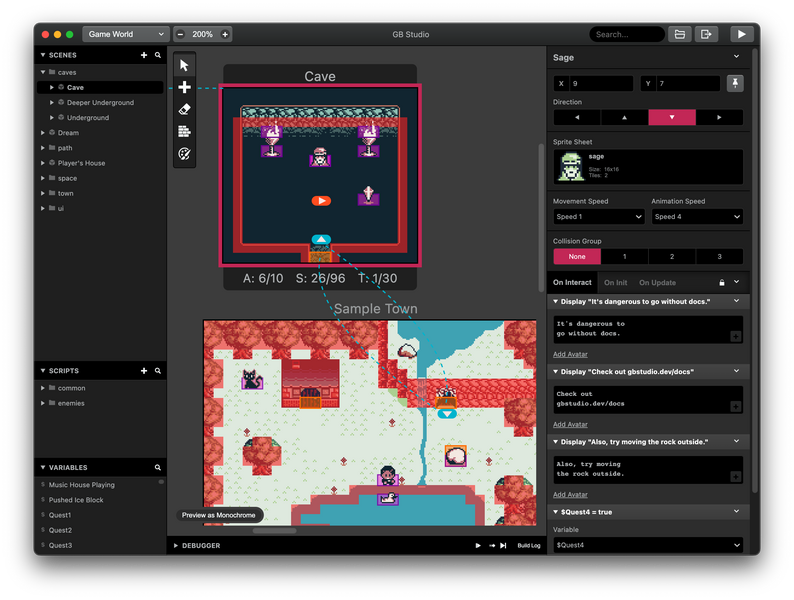
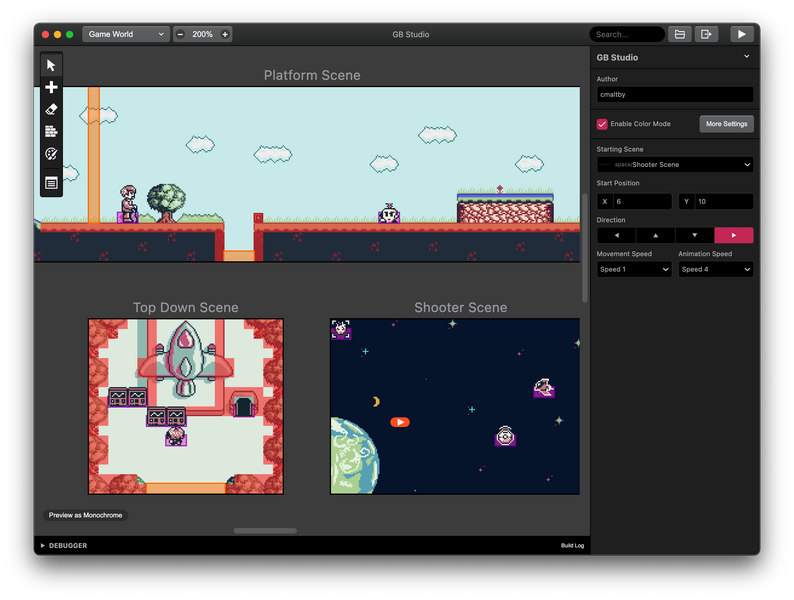
GB Studio is a quick and easy to use drag and drop retro game creator for your favourite handheld video game system.
Please support on Patreon at: https://www.patreon.com/gbstudiodev 🙏❤️
[Update] GB Studio 4.1.3 now available!
I wasn't planning on having another release so soon but 4.1.2 had a few too many issues that needed fixing.
This version fixes the issue where build errors weren't appearing correctly making it very difficult to diagnose why your project wouldn't run, also if you kept seeing "Replace Script?" popups when copy/pasting those shouldn't appear when there are no script changes anymore!
The changelog is available at https://github.com/chrismaltby/gb-studio/blob/v4.1.3/CHANGELOG.md
If you spot any problems, please make sure to report an issue at https://github.com/chrismaltby/gb-studio/issues
[Update] GB Studio 4.1.2 now available!
Before starting on the next round of features, here's a small but important bug fix release. The main fixes is issues where large projects were causing the application to freeze during builds as well fixing the inconsistent pauses that were sometimes being seen as text appeared in dialogue boxes.
The changelog is available at https://github.com/chrismaltby/gb-studio/blob/v4.1.2/CHANGELOG.md
If you spot any problems, please make sure to report an issue at https://github.com/chrismaltby/gb-studio/issues
[Update] GB Studio 4.1.1 now available!
This is a small bug fix release to catch a few issues found in 4.1.0, mostly for anyone who was having issues calling scripts from GBVM. It also includes an up to date Spanish translation thanks to doomer6699!
The changelog is available at https://github.com/chrismaltby/gb-studio/blob/v4.1.1/CHANGELOG.md
If you spot any problems, please make sure to report an issue at https://github.com/chrismaltby/gb-studio/issues
[Update] GB Studio 4.1.0 now available!
This release is a big quality of life update! There’s so many improvements I can’t list them all here!
With this release your project files are getting an upgrade. The first time you save your project in 4.1.0 it will be split into multiple files within a new “project” folder. Instead of everything being in a single “.gbsproj” file, each resource (such as actors, triggers, and scenes) will have its own dedicated file. This update will make it much easier to track changes in your version control system, and makes it easier to work in teams.
You can now create reusable actor and trigger “prefabs”! Perfect for making common elements like enemies or collectables. Design them once, and reuse them as many times as needed. Plus, when you update a prefab, all instances of it across your project will automatically update too.
Dialogue boxes can now have customised layouts! Set whether text should appear at the top or bottom of the screen, if a frame should be drawn, and set specific conditions for when the text box should close. To manage these new options, there’s a new “Presets” feature, which allows you to define multiple layouts and even set a default one. The presets feature has been enabled for Projectiles too!
Version 4.1.0 also introduces the ability to run scripts on new threads, enabling you to have multiple things happening simultaneously. So no need for workarounds, like repurposing actor update scripts anymore!
Sorry for the wall of text! There’s much more than just these changes though, the full changelog is available at https://github.com/chrismaltby/gb-studio/blob/main/CHANGELOG.md#410---2024-09-02
If you spot any problems, please make sure to report an issue at https://github.com/chrismaltby/gb-studio/issues
[Update] GB Studio 4.0.2 now available!
It's only been a week since the last bug fix release but I fixed a few more little issues and didn't want you to have to wait! If you were unable to use random numbers without getting errors this new update should help, and if your project was taking a long time to open I hope you'll be pleasantly surprised with this new version (I've had one very large test project go from taking over 1 minute to open to now be less than 5 seconds!)
Full changelog is available at https://github.com/chrismaltby/gb-studio/blob/main/CHANGELOG.md#402---2024-07-29
If you spot any problems, please make sure to report an issue at https://github.com/chrismaltby/gb-studio/issues
[Update] GB Studio 4.0.1 now available!
I hope you've all been enjoying using GB Studio 4! Since release a few issues had been found and today's release fixes a bunch of them!
Game performance has been improved (should mostly be similar or better than 3.2.1 again!), Japanese users have lots of UI fixes especially around text input, issues with actors references inside scripts have been fixed and more.
Full changelog is available at https://github.com/chrismaltby/gb-studio/blob/main/CHANGELOG.md#401---2024-07-22
If you spot any problems, please make sure to report an issue at https://github.com/chrismaltby/gb-studio/issues
[Update] GB Studio 4 now available!
It’s been a really long time since the last update, but GB Studio 4 is here, and it’s worth the wait!
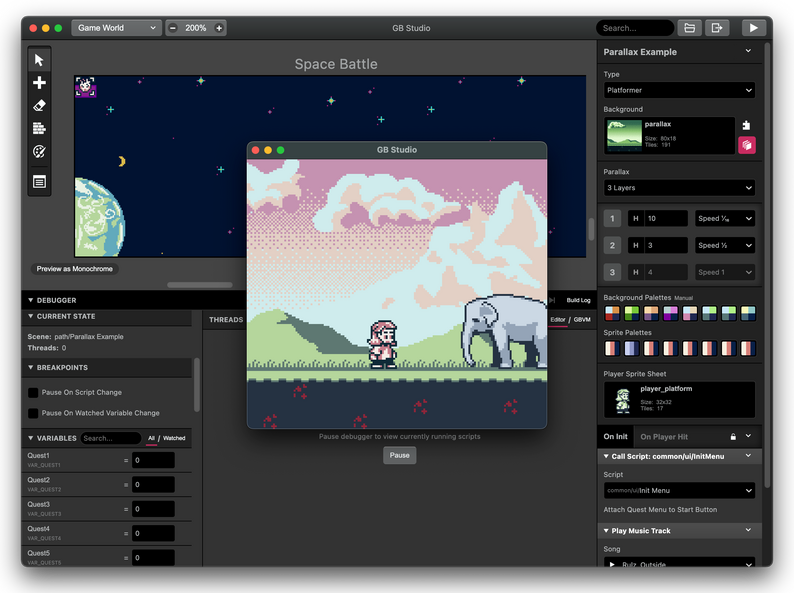
GB Studio 4 introduces a new debugger, allowing you to inspect and pause your scripts, change values of variables on the fly and gain insight into where video memory is being used.
There’s also a new “Color Only” mode, allowing you to double the amount of memory available for sprite and background data. Then there’s automatic palettes, allowing you to supply color background .pngs directly. There’s support for replacing background tiles, for organising your scenes into folders, for running natively on Apple Silicon, loads of quality of life improvements and so much more.
The full changelog is available at https://github.com/chrismaltby/gb-studio/blob/v4.0.0/CHANGELOG.md
If you spot any problems, please make sure to report an issue at https://github.com/chrismaltby/gb-studio/issues
You can support the ongoing development of GB Studio and get access to early releases with Patreon at https://www.patreon.com/gbstudiodev
---
GB Studio is a visual game builder with no programming knowledge required allowing you to make real Game Boy ROMs in minutes. You can run the games on any emulator or you can run them on your Game Boy if you've got a flash cart!
Full documentation is available at https://www.gbstudio.dev/.
It's open source too!
Can't wait to see what you make!
- Chris
Download
Click download now to get access to the following files:
Development log
- GB Studio 4.2.0 Beta17 days ago
- A Little UpdateFeb 06, 2025
- GB Studio 4.1.3 now available!Sep 16, 2024
- GB Studio 4.1.2 now available!Sep 09, 2024
- GB Studio 4.1.1 now available!Sep 04, 2024
- GB Studio 4.1.0 now available!Sep 02, 2024
- GB Studio 4.0.2 now available!Jul 29, 2024
Comments
Log in with itch.io to leave a comment.
i have one suggestion even if it takes 100 years can you make a gba game maker
Is there any way to make bullets fired in GB Studio have different trajectories, like the varied projectiles in Mega Man? Because it seems that bullets can only be made to move in straight lines.
There is a plug-in that allows you to emulate the behavior of Megaman-style bullets.
If you’re interested, here’s the link: https://nokotin.itch.io/custom-projectile-plugin
Thanks for the guidance.
I feel you, bud. I had to make the fireballs in my Mario fangame fly straight instead of bouncing along the ground.
The plugin mentioned by the brother above can effectively alleviate this issue.
Additionally, I'm not sure how to achieve the replacement of individual ordinary tiles in GBS. When I try to replace one, all identical tiles get replaced together. This forces me to resort to character sprites. However, the Game Boy's hardware should be capable of achieving such an effect. For example, in "Harvest Moon," using a hoe to till the land replaces each tile individually as it is tilled.
That might be covered in the next update. However, there is this trick I came up with in my game.
I started with a background that looked something like this:
Then I told the game to replace each tile used for "shocked Keeby" with a solid green tile when the scene started. Then I could put it back to the way it was when I was ready to show "shocked Keeby" again. Of course, I could have achieved this same effect using sprites, but I did it this way to make room for more sprites to appear in a row together. It ended up looking like this in the VRAM:
with shocked Keeby:
without shocked Keeby:
Maybe you could try something like that if you've got enough VRAM space.
I see, learned something new. That reverse thinking approach is so clever!
What if you make the music wobble or change tempo on update event
and also 256 color image on logo automatic only just like
At least 4.3.0
GBA next? Btw, pretttttyyy good for homebrew and making your own little nostalgic game company
this is amazing
is this open source, to be modded/have ad-ons?, this is amazing but it can be difficult to do some more specific/complicated things
I enjoyed making a fangame with this engine. Once the new update comes, I think I'll start a new project with my original characters.
Can you fix the animation state and swap titles because it might had an issue with that. I see a glitch!
Can you make a platformer mode where the player can swim?
I've made a platformer game where there's a short swimmable section. I just altered the physics to make everything slower and then attached a "Player Bounce" event to the jump button to make the player rise with every tap.
that's pretty clever.
i hate it👍
No one cares, we love it!
Your mom hate something too and that's you
How do you import backgrounds?
Import backgrounds? This game engine uses .png files for backgrounds. All you should have to do is put them in the assets/backgrounds folder.
Can I place issue here
I need help here some reason I was trying to building rom its showing me this error
Error: spawn cmd.exe ENOENT
Error: spawn cmd.exe ENOENT
Error: spawn cmd.exe ENOENT
Error: spawn cmd.exe ENOENT
and don't forget! I just played the gameboy color game called mickey's speedway because it has an fmv screen so, we need is a logo with background automatic colors so it can make an fmv bbr colors with that and one more thing, the super gameboy border needs to use as a change border plugins
I think we should start by being able to create backgrounds like they did for Bear in the Big Blue House. They were able to use more colors at once by changing the palettes every two scan lines.
Also, there's the DK Land trilogy, where the VRAM is updated every frame to allow for more complex sprite animation. These two functionalities should theoretically be added before attempting to utilize full-motion video, wouldn't you say?
There was a problem because you need to update because the actor state had some bug issues and needs to be fixed
I'm getting a weird error that doesn't let me compile games.
error message below
Preparando variables...
Preparando imágenes...
Preparando tilesets...
Preparando la interfaz...
Preparando sprites...
Preparando avatares...
Preparando emoticonos...
Preparando música...
Preparando fuentes...
Preparando escenas...
Preparación completa
Compilando eventos...
Eliminando carpeta _gbsbuild
Copiar motor predeterminado
Buscando motor local en assets/engine
Motor local no encontrado, utilizando motor predeterminado
Buscando plugins del motor en plugins/*/engine
Validando archivos de construcción...
Compilando: src\core\absolute.c
Compilando: src\core\actor.c
Compilando: src\core\bankdata.c
Compilando: src\core\bootstrap.s
Error: spawn cmd.exe ENOENT
Error: spawn cmd.exe ENOENT
Error: spawn cmd.exe ENOENT
Error: spawn cmd.exe ENOENT
-4058
Construcción cancelada
did you set the language to Spanish by any chance?
Can this be used to create games for windows?
This creates a Nintendo Gameboy ROM file that cam be played on Windows with an emulator.
I think the best emulator is Sameboy: https://sameboy.github.io/
That's what I used. The Mac version has a debugger that lets you look behind the scenes of your favorite Game Boy and GBC games. It helped me learn how to recreate items and physics from other games to use in my fangame.
You could upload your game to itch.io so it can be played from a browser.
This was a great tool, but I think I should take a break from it for a while. It's hard to manage all of the .gbsres files all over the place. I prefer when everything was all saved in one .gbsproj file.
Hello, is there a way to use human voice audio in GB Studio?
Yes. Here's a tutorial on how to add sample sounds into your projects.
https://www.youtube.com/watch?v=QWs0S_KI3n0
Thanks for your answer. I'm a beginner and have encountered another problem - I hope I'm not causing you any trouble. I want to achieve an effect where half of the background remains unchanged while the other half changes. I found that only the 'Replace Tile At Position' function can do this, but this function can only modify one Tile at a time. Is there a way to modify many tiles in bulk? Or is there a better method to modify part of the background? I'd love to hear your suggestions.
I actually had to do something similar in the game I made.
https://itch.io/post/12441212
If this doesn't work, you could also create multiple scenes with a common tileset. I used both methods for the karaoke sequence in my game.
Thank you for your answer!I have noticed that switching the lens often causes screen distortion.
What I find truly remarkable is the 'Replace Tile At Position' functionality - its exceptional capability to overcome GB's inherent tile limitations and achieve stunning visual effects is unparalleled. However, this powerful feature appears to be underutilized in current workflows, possibly due to its relatively complex operation sequence.
First off -- THANK YOU for this awesome tool! We had a blast discovering it during a Jam this weekend (game here if you want to see it). Getting to play a tiny game of ours on the actual machine was immensely nostalgic.
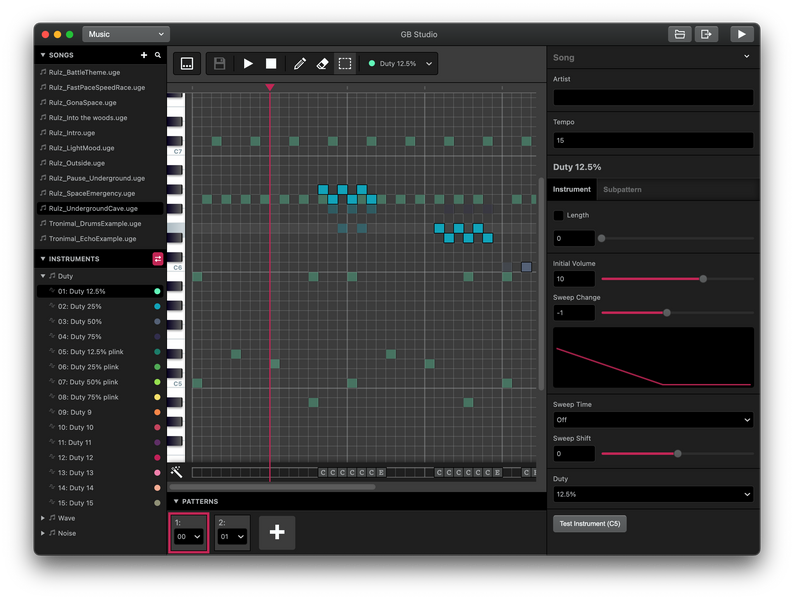
I was wondering though, is there (or are there plans to include) a way to use a MIDI keyboard to write music in the tool?
Thanks =)
make it so I can do this on chromebook
I wanna use this on mobile
Me too😭😭😭😭
But on amazon kids tablet
Upgrade of android pls gbstudio
Make in-game conversations compatible with other languages PLS
If you're saying you want games to be playable in other languages, these GB Studio Central articles should help you figure out how to add languages to your games.
https://gbstudiocentral.com/tips/understanding-fonts/
https://gbstudiocentral.com/tips/how-to-multi-language-mechanic/
thank u so much❤️❤️
Hey, i was wondering if one day you can make a thing that can make games for the Sega Genesis/Megadrive and the Sega CD/Mega CD (and maybe the 32x) i know its kind of alot but it would be a real dream for something like this
Someone fulfilled your dream! I haven't tried it but it looks awesome.
https://mdengine.dev/
oh my god, Oh My God, OH MY GOD!!! this... is... a... DREAM! COME! TRUE!!! like, bro. I FOUND MY BEST REASON TO GET AN ACTUALL SEGA GENESIS!!
Go all out, man! Genesis rocks, I hope you create something beautiful with that!
(I'm currently learning the sound chipset, can't beat the sound grit of that console)
please add controller suport for the baked in emulator or can some one teach me how
Does pressing a button on the controller not map it to the controls you select in the Settings tab?
Oh, but I guess that would cause problems for web builds because someone else may have a different controller than you.
Please compile it for armeabi processors
How can I display text that exceeds the 256 characters in the ASCII mapping when the game is running? These texts can be displayed when the game is made, but not when the game is runnin.
Try using multiple fonts and swapping them out as necessary within dialogue events.
Thank you for your reply. I don't quite understand how to operate it yet, but I will give it a try.
On the variable text width font, the blank space is always white, with no way to change it. Please add a setting for the font to choose which color that extra space should be! (My project uses a black background and the white square looks really annoying and the only way to fix this is by typing a really annoying string of text before every textbox)
Can we see an example?
how to on arm based processor
on linux
Doesn't look like they support arm linux despite the fact that there is in fact an arm-based Mac version. I'm not entirely sure why it was never released since it would be great to see on SBCs like Raspberry Pi. It's not like they can't handle Game Boy Development. If anyone knows how to compile for ARM LInux, or at least if it can be done, let us know..
You should tackle a project, that will make it work on Chromebook better, or even better yet, make a online version of this through web browser
Can yall focus on a mobile build
This seems cool I just have no coding braincells
I have issue for running in my pc
it showing me this error
Error: spawn cmd.exe ENOENT
Error: spawn cmd.exe ENOENT
Error: spawn cmd.exe ENOENT
Error: spawn cmd.exe ENOENT
-4058
Cancelled Build
Warnings:Error: spawn cmd.exe ENOENT
Error: spawn cmd.exe ENOENT
Error: spawn cmd.exe ENOENT
Error: spawn cmd.exe ENOENT
-4058
same
I can't delete it. Can someone help me?
Error: EPERM: operation not permitted, unlink 'C:\Users\___\AppData\Local\Temp\_gbstools\gbdk\bin\sdasgb.exe'
Great work, the engine is incredible and has generated a huge range of new games in just a few years. Thousands of new titles, I think Master System also deserves attention in this regard.
I will check if the source code is available and analyze if it would be possible to add an extension version for Sega Master System, as it would certainly take advantage of a lot of what is already ready.
is there a option to make gba games
Haven't you read the other comments regarding GBA compatibility?
no
Is there a way in GB Studio to add one scene into another? To merge them together? For example, to change and display character's outfits?

(not my art, just a reference from pinterest)
I've got an idea. What you can do is make a background with multiple 'screens' and have the camera jump from one screen to the other. For example, I used this background image to give large text a fading effect:
I have a bit of space between the screens because of the way the Game Boy renders backgrounds (it uses a 256x256 tilemap that wraps around for larger scenes). You can fill this extra space as needed for non-static scenes (like I did with the blank stage).
pinterest user spotted, opinion rejected (jk)
Wow