



💫 cleanup is a CLI tool for keeping your Git repositories clean. It removes old branches in one or more repositories with a single command.
Project status: In active development and stable to use.

You merely need to provide the path to your repository. For example, change into your project directory and remove all gone branches:
$ cleanup branches .If you want to get a preview of branches that will be deleted, just perform a dry run.
$ cleanup branches --dry-run .There appear some branches that probably shouldn't be deleted? You can simply exclude them:
$ cleanup branches --exclude="feature/3, feature/4" .Cleaning multiple repositories at once
Many developers work on multiple projects at once. Let's assume that these projects have a common parent directory.
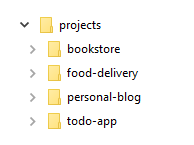
Deleting gone branches in all of these repositories is fairly simple:
$ cleanup branches --has-multiple-repos projectsDownload the latest release of cleanup.
Linux/macOS
Copy the downloaded binary into a directory like /usr/local/bin. Make sure the directory is listed in PATH.
Windows
Create a directory like C:\Program Files\cleanup and copy downloaded executable into it. Add the direcotry to Path.
Especially developers working in larger teams may want to clean up their repositories periodically.
Linux/macOS
Edit the cronjob table.
$ crontab -eAdding a line like this will run cleanup every day at 11 PM for all repositories. Make sure you provide a correct paths to the cleanup binary and project directory.
0 23 * * * /usr/local/bin/cleanup branches --has-multiple-repos /home/user/projectsWindows
You can created a scheduled task via GUI or command prompt. Again, make sure to provide correct paths for the cleanup executable and project directory.
> SCHTASKS /CREATE /SC DAILY /ST 23:00 /TN "Clean up repositories" ^
  /TR "C:\Path\To\cleanup.exe branches --has-multiple-repos C:\Path\To\Projects"